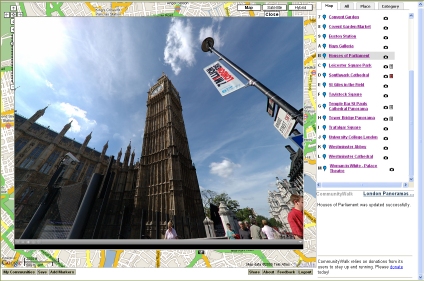
As we posted a couple of days ago Google have added panoramas to their Google Maps services with the launch of Street View. Currently available for Silicon Valley, Las Vegas, Miami, Denver and New York new areas will be added over the coming months.
The YouTube movie below from Google explains the concept:
Taking a closer look the data is provided by Immersive Media Corp, a digital video imaging company founded in 1994 captured in what is basically streaming video linked to a GPS. Using an 11 lens camera system (pictured right, see 'What is Immersive Media' for more info) data is streamed in and merged in realtime to provide panoramic video. See theImmersive Demo page for examples.
We used an early unit five years ago to capture panoramas around London, the system is easy to set up, basically the camera is mounted via a suction cup to the roof of a car and the data saved via a small form PC.
Pictured below is the car used to capture the images for Google:
The YouTube movie below highlights the use Google Street View in San Francisco - note the ability to zoom but also the numerous problems with stitching and image matching:
While the Immersive system is indeed impressive it does suffer from problems due to cameras going out of alignment and changing lighting levels between each of the 11 views. As such although it allows the rapid capture of cities - all you need to do is drive each route - the quality sometimes leaves a lot to be desired when compared with the more traditional panoramic techniques.
The image below highlights these issues:
Perhaps of more interest to the panoramic community as a whole is the ability to link in your own views using the recently released KML 2.2 beta specifications. This includes the ability to tile images, perhaps allowing fully immersive, high resolution panoramas in both Google Earth and Google Maps.
KML 2.2 beta looks like it contains the ability to view spherical panoramas in Google Earth:
Description
The element allows you to geographically locate a photograph on the Earth and to specify the placement and orientation of the Camera that views this PhotoOverlay. The PhotoOverlay can be a simple 2D rectangle, a partial or full cylinder, or a sphere (for spherical panoramas). The overlay is placed at the specified location and oriented toward the Camera.
Because is derived from , it can contain one of the two elements derived from —either or . The Camera (or LookAt) specifies a viewpoint and a viewing direction (also referred to as a view vector). The PhotoOverlay is positioned in relation to the viewpoint. Specifically, the plane of a 2D rectangular image is orthogonal ("at right angles to") the view vector. The normal of this plane—that is, its front, which is the part with the photo—is oriented toward the viewpoint.
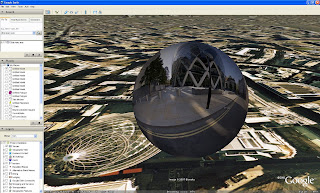
Looks like our Google Earth Panorama viewer (pictured above) may of had its day. Soon as we get a working version we will put up more details and a movie.
Microsoft have released 3D data for New York in their Virtual Earth browser. Created using their semi-automatic capture technique the results out-strip Google's Google Earth city model. The movie below provides a flythough of the model:
The scale is impressive, while watching the movie there are times when you forget its a model and that is the sign of a well produced digital representation of the city.
In our previous post on the Populating the Digital Earth we noted Microsoft's view on the construction of their 3D cities:
this is a very expensive process to get off the ground. The startup costs are astronomical and the complexity is daunting, but it scales very well - the cost per building comes way down if you plan to create models of 1000's of buildings (and that's just one city!). If you only wanted to model 1 or a handful of buildings you would grab your favorite 3d modeling package and have at it. But if you want to model all of say Manhattan or London, it would be prohibitively time consuming and expensive. Each approach is valid and has its place. I think that's why our 3d team opted to employ both.
Frank Taylor at the Google Earth blog notes that Microsoft intend to have 500 cities completed by next year. As expected Microsoft have taken the digital earth to new levels.
If this level of detail was in Google Earth there would be a flood of posts on the web praising the next step in virtual globes, yet as its Microsoft the reception seems strangely muted.
Google have added panoramas to their Google Maps services with the launch today of Street View. Available for Silicon Valley, Las Vegas, Miami, Denver and New York new areas will be added over the coming months. The YouTube movie below from Google explains the concept:
Captured using vehicle based panoramic cameras linked to a GPS the innovative nature of the panoramic views is the way in which the interface has been developed. The track of the next available view floats in '3D' space within the panorama allowing a seamless way to navigate between scenes.
Social Networks are the current hot topic with sites such as FaceBook, My Space and Friendster to name but 3 of the 100 + notable networks competing for users. The unique selling point of the latest site on the block -My Mini Life - is its ability to embed your information within both blogs and other network sites as well as the introduction of 'Sims-esk' 3D.
Using simple tools you can add walls, doors and structural detail to your own space and then furnish it according to a number of supplied objects. In essence it is possible to create your own architecture, albeit in a simple form. As such it is interesting to explore the types of spaces the ever growing number of users create.
We have embedded below our first space within My Mini Life, simple click to visit:
The ability to build, chat and embed architectural spaces in a blog is intriguing...
Visit My Mini Life for more info and to register - creating a space is free.
Microsoft have just released a data update for their Virtual Earth layer of London. London is now available to view using their 'BirdsEye' system. The unique selling point of the BirdsEye view is the ability to view any location from 4 angles - north/south/east and west. Pictured below is an example from the London dataset of St Paul'sCathedral:
BirdsEye is a welcome addition, it provides a unique insight into the architecture of London.
You can view St Paul's and the rest of Central London direct via Virtual Earth
The top image btw is where Digital Urban is based....
Posts will be slightly sporadic this week as I've been called out of London due to a family matter..
That said - we have a new Map of the Week post lined up, along with more Google Earth aerial panoramas and when we are back in the office the second part of the Oblivion Tutorial.
Just thought i would let people know.. in case anyone thought i was slacking :)
ZahaHadid has been granted planning permission on her 900m² project at Hoxton Square in London. Flanked each side by listed buildings the development stands to make a bold addition to the square.
The movie below, posted by RoveTv to YouTube gives a visual insight into the building:
Providing an overview of the project as well as a internal tour the render is a good example of simple understated visualisation.
The Northern An Khanh New Town Development Project in Vietnam is the starting point of a new city. Development started in December 2006 and is scheduled for completion in June 2020 aiming to achieve a balance between Housing, Culture, Industry and Ecology.
Our interest lays in the promotional video, running at over 8 minutes it features some impressive animation, as it typical of high-spend projects requiring the best in architectural animation:
The city animation is stunning, so much so our suitcase was half packed before the animation finished. Digital animations of cities can be an effective marketing tool if used properly. Although a totally unfair comparison it put us in mind of the 'Birmingham City of the Future' movie on YouTube:
The film was made by Birmingham medical students for the Comedy Revue 2006, uploaded to YouTube by Matthew Doyle.
The image above takes away the natural geography of the city and replaces it with classifications of neighbourhoods - known as Geodemographics it provides an overview of the social and economic characteristics of your local neighbourhood.
The use of geodemographics details a unique insight into the city in terms of its cultural and social structure. This information is widely used by commercial companies to decide how to target customers with products or services depending on a number of classifications and in terms of academia it provides a good insight into the social geography of the county. As such the Output Area Classification User Group has been formed with the mission of promoting the use of the National Statistics Output Area Classification (OAC) and area classifications.
The Group is focused around the well established methods and output of area classification, but OAC is distinctive as it is in the public domain - a basis for ‘open geodemographics’ - encouraging interchanges between sectors on issues ranging from the underlying statistical methodology to interactive graphics for effective presentation. This open approach is possible as a result of relatively recent changes in the policy on access to government information.
Using our labs Google Map Creator it is possible to view the Output Area classification of the UK. The Output Area classification (OAC) distills key results from the 2001 Census for the whole of the UK at a fine grain to indicate the character of local areas. It was created in a collaboration between the Office for National Statistics (ONS) and the University of Leeds using the same well established methods as the related classifications of local authorities and wards.
Too date we have used the spheres to produce a sample high definition concept movie featuring 360 x 180 degree views of The Chapel of Peter and St Paul by Wren, Southwark Cathedral, The Painted Hall by Wren and St Giles in the Field, London.
Taking the concept further we have developed the Google Earth Panorama Viewer which takes images from Flickr or your hard drive and using a reversed face sphere allows you to 'Step Inside' buildings and scenes in Google Earth. The movie below highlights the idea and you can follow our tutorial to find out how to create your own:
Embedding Panoramic Spheres Inside Buildings
The same concept can be developed within the Oblivion Engine - again this is sample work while finding files to try out for the forthcoming second part of the tutorial. The movie below illustrates a panoramic 'Step Inside' sphere of the South Pacific Railroad in Oblivion:
"a 3 ft (914 mm) gauge narrow gauge steam railroad running between Santa Cruz, California and Alameda, with a ferry connection in Alameda to San Francisco. The railroad was created as the Santa Clara Valley Railroad, founded by local strawberry growers as a way to get their crops to market in San Francisco and provide an alternative to the Southern Pacific Railroad. In 1876, James Graham Fair, a Comstock Lode silver baron, bought the line. He extended the line into the Santa Cruz Mountains in order to capture the significant lumber traffic coming out of the redwood forests.
In 1887, the line was acquired by the Southern Pacific and the gauge standardized. In later years, the segment running between San Jose and Santa Cruz was used by SP's "Suntan Special" which came down the San Francisco Peninsula and took passengers right to the beach and boardwalk in Santa Cruz. Service was disrupted by the 1906 Earthquake[1]. The tracks through the Santa Cruz Mountains suffered major damage during a storm in the winter of 1940, and the line was abandoned the same year."
The panorama was captured in High Dynamic Range giving it a slightly unreal look:
Not to be confused with our Google Earth Panorama Viewer - which allows you to view panoramas inside of Google Earth - we present another panorama created from Google Earth (its confusing i know!).
Ed Parsons the Geospatial Technologist at Google mentioned these panoramas in a mini write up on digital urban recently. Indeed it turns out our London panorama is now part of his Mac Desktop, see our Google Earth Panoramas Thread for a full list which includes London, New York, Moscow, Belgium, Paris, Sydney and The Desolation Wilderness.
We note Ed's words - 'These images really are things of beauty. Gentle reminder though guys… You should not strip the Goggle logo off the images !!!' and are working on a way to keep the copyright intact as to be honest its a good point and one that has been on our minds for a while.
As an update to the previous post on Many Eyes - it is simple to upload your own data and choose a variety of visualisation techniques.
For example we illustrate below the Tag Cloud for this blogs posts over the last week:
Oblivion has figured strongly - due to the tutorial - it creates an interesting view of both the blog and the topics we cover. You can view the Tag Cloud direct from the Many Eyes site.
We will be covering more Many Eyes visualisations in the coming weeks...
With the focus of this blog on the third dimension it is sometimes easy to forget how powerful two dimensional visualisation can be. The sticking point to social scientists is often the difficulty involved in making clear and understandable visualisations - at which point Many Eyes comes to hand a fantastic site where users openly share data and visualise.
The diagram below represents a Topographic View of the London Underground:
A vector based version can be viewed on the Many Eyes site which you can either comment on, manipulate or more importantly download the raw data and make your own visualisation.
Sometimes you just stumble on a great site and Many Eyes is definatly one of those times.
This tutorial is aimed at providing a clear and easy to follow path through the often confusing route of using the Oblivion Game Engine for visualistion.
Oblivion is an impressive engine and once you have completed the tutorial it should become second nature to go from SketchUp/3D Max to real-time visualisation with dynamic lighting and weather effects.
Due to the nature of the tutorial we have divided it into two parts. The first is aimed at setting up the level editor, known as the Elder Scrolls Construction set, and creating your first world. The second part provides a walk through from SketchUp and 3D Max into the environment you will of created by the end of this post. More information and guides can be found at the Elder Scrolls Wiki.
Launch the Elder Scrolls Construction Kit from the Bethesda Softworks link in your Windows 'All Programs' list. Your screen will look similar to the image below.
Step 2
Select 'File' then 'Data' and load Oblivion.esm from the list. This loads all of the object sets and the environments from the game into the construction set.
Creating Your World
Step 1
Select 'Worlds' then 'World Spaces' from the top menu bar.
Step 2
Right Click on any of the World Names in the list under 'Editor ID', Select 'New'
Step 3
Name your world in the dialogue box - we used DigitalUrban. Select the following options as per the image below (click for larger version). In short - Sharable Data 'Clear Climate', Usable Dimensions 'X=3 Y=3', Tick Oblivion World Space and Small World.
Once the options are selected, Click 'OK'.
Step 4
Your World is now named and created ready to select as a World Space. Click the drop down box in the Cell View/World Space and select your World - in our case DigitalUrban as pictured below.
Step 5
Double Click 'Wilderness'. You will now have a list of cells, all named Wilderness and a purple screen in the soon to become 3D view:
Making a Landscape to Build On
We now have a defined but empty world, to build or import objects we need a flat plain of land. Oblivion is able to display complex landscapes, however for our application we simply require space to visualise.
Step 1
Select 'World' then 'Heightmap Editing' and your world name from the pop up dialogue box - this opens to Heightmap Editing Tool.
Step 2
To create a flat plain set both 'Frequency' and 'Amplitude' to 1 and 'Base Offset' to 5000. Click 'New Seed' and then Click 'Generate'. The construction set will now create an even height map according to the height indicated in the Base Offset - in our case 5000 and a resulting blue fill.
To create a mountainous landscape change the numbers in Frequency and Amplitude. Your Heightmap should now look as per the image below:
Click 'Save', wait for the editor to complete the process and then close the height editor - your terrain to build on is now complete.
Your First Object
We now need to carry out a few steps to make sure we know what 'cell' we are building in and to ensure that the relevant cell is selected.
Step 1
Rename the first cell on the list - currently called Wilderness - Click once on 'Wilderness' and wait, you will now be able to rename the cell, we used the name 'Cell1'
Step 2
We need to make sure the 3D window is dark green and not purple - if it is purple double click on any cell and then double click back on Cell1. This will make sure it is selected.
Step 3
The world is currently on the dark side - Click the 'Lightbulb' icon in the top bar. The 3D window will now turn a lighter green highlighting the grass in Cell1.
Step 4
In the Object Window select 'World Objects' and the 'Trees' you will see a list of trees that you can add to your world. Select any tree from the list and 'Click and Drag' to the 3D Window. We selected 'Tree EastHemlock'. Your tree will now be floating above the world as pictured below:
To make the tree fall to the ground 'Press F'. You can now take some time to get used to the 3D navigation in the window. Use the Mouse Scroll Wheel to Zoom and Out, Hold Down Shift and Move the Mouse to Rotate. Click on the Tree Icon in the Cells List to jump back to an overview of the object.
Any object from the 'Static' objects list can also be dragged into the window. This is how we are going to add our import from Sketchup/3D Max in part 2.
Save your world by clicking the 'Save Icon' and give your world a logical name, we used digitalurban.esp
Constuction of your first world is now complete, close the Elder Scrolls Construction Set.
Viewing Your World in Oblivion
There are now just a couple of steps to take to enable Oblivion to load up your new world rather than the default game.
Step 1
Go to the folder - 'My Documents'/'My Games'/'Oblivion' and open Oblivion.ini in either Notepad or Wordpad. We are now going to edit the file to ensure Oblivion loads our new world.
Make three changes to the Oblivion.ini file - add your Starting Cell name, in our case Cell1, your Starting World name and the name of your file in STestFile10=, in our case again digitalurban.
Save this file.
Step 2
Launch Oblivion - you are now ready to view your world. Select 'Data Files' from the Oblivion start screen. A menu will appear allowing you to load your new world. Select 'Oblivion.esm' and 'YourWorldName.esp' - ours is DigitalUrban.esp. Click 'OK' and now Click 'Play'.
The YouTube Movie below demonstrates our sample world created by following the above steps:
Note that when the world first loads the graphics are flicking and the sky is displaying errors.
This is easily fixed by:
Step 1
Press the key next to 1 on most keyboards labelled '¬' or '~' this allows console commands to be entered. Type 'TS' and then 'Press Enter' now repeat and you will see that the sky is now correctly turned on. There are a number of commands you can use in this mode to turn functions such as Flying, God Mode and Weather Effects on and off, see GameSpots guide for a full list.
Step 2
Press 'T' to allow you to advance in time - towards daylight, select 7 hours.
Your world is now complete and navigable within the Oblivion Engine. Use W/S to move forwards and backwards, A/D to move left and right. Press 'R' for a third person viewpoint.
In Tutorial 2, available shortly, we will export an object from SketchUp and 3D Max directly into our new world. You can view some SketchUp/3D Max examples so far from our previous post.
Linking panoramas with Google Maps has been a aim of many panorama creators - we have added overlays within Google Maps via Quicktime, complete with interaction - but its always nice to have a marker showing where you are looking (see our Google Map Panorama Post for a working example, as pictured below).
Map Movin 360 takes this a stage further by linking panoramic video and Google Maps, the result is the ability to pan around the video with Google Maps updating according to your viewpoint.
Map Movin 360 is well worth a look - it would be interesting to see if the same could be done with QuickTime panoramas or the emerging flash panorama viewers.
A quick temporary post to provide an update on the forthcoming SketchUp/3D Max importing into Oblivion tutorial. Importing into game engines is a notoriously difficult process for the first time user, in light of this our aim is to make a simple to follow tutorial that allows one to get to grips with the level editor as well as the work flow for importing.
At the moment we have reached the point where if you follow the stages you will end up with a flat plain of land, a working environment and a single object from the Oblivion data set - as the movie below illustrates.
This is viewed as part one - we are now just making out minds up to create the tutorial in parts or as one long post.
In short - we are working on it and it'll be online soon as we can.
The Linden Blog as well as The Arch have covered the soon to be released sky simulator in Second Life currently known as Windlight. In a press release Linden Labs, the makers of Second Life, state that they have acquired WindLight®, an advanced atmospheric rendering technology; Nimble™, a realistic 3D cloud simulator; and associated intellectual property and interests. Following this acquisition, Linden Lab will open source Windward Mark's leading graphics technology and integrate it into the Second Life Viewer software, bringing striking visual realism to Second Life.
The movie below demonstrates an early beta release:
Windward Mark Interactive was founded in 2003 by five Harvard University students looking for a better way to create real-time worlds. Working with professors at Harvard and MIT, the team developed revolutionary rendering algorithms that paved the way for its current technology.
The integration of a more advanced atmosphere simulator should be welcomed in Second Life as one of the hold ups in using it in a professional capacity is often how the render engines looks when demoing work at conference or in the office environment.
People are used to high end 3D Max renders or console quality graphics in towards urban visualisation world. Second Life has made a move in the right direction, hopefully the lighting will move to the actual objects in the world as a next step.
The introduction of real-time shadowing, not unlike those in Oblivion, would make a lot more architecture and visualisation companies sit up and take notice. At the moment Second Life is seen by some as a bit of a gimmick - whereas it has the capacity to be a genuinely useful tool.
Another in the series of kmz files utilising our Google Earth Panorama Viewer. The movie below features a panorama of St Mawes Castle in Cornwall (UK) by Evolve.
The castle is one of the best preserved and most elaborately decorated of Henry VIII’s coastal fortresses, St Mawes was built to counter invasion threats from France and Spain. The clover-leaf shaped fort fell easily to landward attack by Parliamentarian forces in 1646, and was not properly refortified until the late 19th and early 20th centuries.
If you would like to make your own Google Earth Panoramic Sphere then feel free to Follow our Tutorial which includes examples files and a walk through on making your first example.
Amsterdam is now available in 3D via Google Earth - rendered in the current grey building standard with photorealistic landmarks it can't compete with the new cities being rolled out by Microsoft's in Virtual Earth - such as Buffalo in the US and Swindon/Brighton in the UK - see our post on Populating the Digital Earth for more info and movies.
Nevertheless its still impressive:
Of note is Engadget's reporting of the forthcoming Where 2.0 conference with announcements due on the use of technology used to scan building faces and improve the 3D portions of Google Maps and Google Earth.
Sadly we are not going to Where 2.0 - unless someone send us - but keep checking the Google Earth blog as Frank Taylor will be blogging from the event.
Games lead the way in terms of the visualisation of cityscape's and with Spiderman 3 being the first release of the series on the new generation of consoles the city visualisation is fasinating. Available on multiple platforms - Xbox 360, PlayStation 3, PC, Wii, PlayStation 2, Nintendo DS and Game Boy Advance - the game is based in New York and thus as is the nature of Spiderman games sees you webslinging your way around the city.
In terms of city visualisation the genre is suited to high rises and long draw distances. As UK GameSpot note in their review of the game - The city isn't gigantic, but there's enough familiar scenery around to make you want to explore, and that the city looks excellent is a big plus. Buildings are nicely detailed, the streets are jam-packed with cars and pedestrians, and the game uses some nice lighting effects to give the sky, as well as reflections of the sun off buildings, a rather pretty glow.
The three YouTube movies below provide an overview of the cityscape - from the game trailer to a run down of the city map and finally general gameplay.
Spiderman 3 Trailer
The City Map
Game Play
As ever with such games we, maybe uniquely, don't focus too much on gameplay but on shear visualisation and the ability to explore the urban realm. As such Spiderman 3 is a game that should be on display in any architecture office if only to simply open peoples minds up to what can be achieved with game engines.
We are currently working on what has turned out to be our most requested tutorial to date - how to import SketchUp and 3D Studio Max models into the Oblivion Engine.
As an update for those new to these series of posts using the PC game Oblivion it is possible to easily import models from both 3D Studio Max and SketchUp. This opens up the ability to use the real-time lighting and weather effects within Oblivion for architectural visualisation.
The movies below provide an overview of our experimental imports to date, the tutorial will detail a step by step walkthrough of how to achieve the following:
University College London - SketchUp to Oblivion
London Eye - 3D Max to Oblivion
Fantasy City - 3D Max to Oblivion (Large Scene Sample)
The tutorial should be online Wednesday 23rd May, you can purchase Oblivion via our Amazon Store which includes the Elder Scrolls Construction Kit required for the tutorial.
Punch card auto dialling and the move from dialing to push button phones - welcome to the future 1962 style. The film below, made by Bell systems, provides a charming look at the future of telecommunications as detailed at the Seattle Worlds Fair.
The movie is positively exuding optimism, something that is lacking in many promotional movies nowadays and note how the glimpse of the future is so exciting the couple just simply have to run everywhere...
Thanks to the Arkitektur blog for providing the YouTube link.
Another in the series of Google Earth Panoramic Spheres - this time featuring a panorama of the Hoover Tower, Stanford by Scott Haefner. Scott used our viewer to embed a kite based aerial panorama above the tower at Stanford.
The movie below demonstrates the principle of the viewer as well as providing an insight into how it can be used:
The Hoover Tower serves as a landmark of Stanford University to faculty, students, alumni and the local community. Completed in 1941 to celebrate the university's 50th anniversary, the 285-foot structure offers superb views of Stanford and the Bay Area from its observation deck. Atop Hoover Tower is a carillon of 48 bells cast in Belgium. The largest bell is inscribed, "For Peace Alone Do I Ring."
If you would like to make your own Google Earth Panoramic Sphere then feel free to Follow our Tutorial which includes examples files and a walk through on making your first sphere.
As an update to the post on Augmented Reality we have got a work flow in place and sorted out a few recommended paths to creating your own Augmented Reality.
The movie below displays a landscape model on our desk by way of a work in progress:
As a side note - it would be an interesting way of viewing Google Earth..
Friday again so another urban Line Rider movie - this time the guy on the sledge travel across the cityscape listening to 'Anytime' by Eve 6, posted on YouTube by supertod:
Take a look at the tutorial by clawz114 below to get an idea of the complexity behind making these movies:
If you make your own Urban Line Rider scene let us know.. you can start by going to the Line Rider site.
Augmented Reality used to be in the realms of high-end research labs, limited to virtual reality headsets and motion sensors. As with all technology it filters down over time to the home user, yet despite interesting advancements Augmented Reality has yet to go main stream.
It is however remarkable how easy it is to implement with just a standard webcam and some open source software. Over the coming weeks we will be taking a closer look at creating your own Augmented Reality, specifically for visualising urban areas via augmented maps.
The demo below illustrates the level of output possible:
Of note is how Augmented Reality almost made the consumer breakthrough via the sadly defunct Gizmondo handheld console:
With the introduction of the camera for the Playstation Portable it is possible that the concept will again see the light of day on a console.
Simple, low cost Agumented Reality has direct applications for both the teaching of geography in the classroom as well as higher end planning/architecture descion making and depending on how the next week goes we should have some more info and a tutorial online shortly.
Thanks go to to Chris Hinton at Demontfort University who demonstrated the concept at a meeting on Virtual Leicester and who has been writing his own code to enhance the software.
For more background information on the processes behind Augmented Reality see 'A City-Planning System based on Augmented Reality with a Tangible Interface by Hirokazu Kato, Keihachiro Tachibana, Masaaki Tanabe, Takeaki Nakajima and Yumiko Fukuda of Osaka University, Hiroshima City University, Knack Images Production Center and Hiroshima Institute of Technology (Pdf Document).
As camera resolutions increase so does the demand to visualise high resolution visuals over the web - this is especially true in terms of panoramas due to their creation using multiple imagery.
We have released our own simple solution from our lab using Google Maps - see GMap Image Creator and now Microsoft has taken this a notable step further. The research lab at Microsoft notes that:
HD View was developed with a number of goals in mind. It should:
allow smooth panning and zooming on large images,
only download enough data to create the current view (and possibly look ahead to the next), and
always display the current field of view with an appropriate projection. This means that when zoomed way in you should be presented with a standard perspective projection providing a sense of immersion, and when zoomed out you experience a curved projection so that get a full overview of the scene. In between the projection should smoothly transition.
The movie below provides an excellent overview on not only HD View but also the capturing and stitching process in general:
At the moment HD View is an ActiveX® browser component, thus the first time you use it you will be asked to install the component. It also only runs in Internet Explorer® under the Microsoft Windows® operating system.
In our post a few days ago on location aware devices we speculated that next few years will see more and more devices launching with integrated GPS units and with these we expect to see a lot more location aware services.
Location aware services are a very simple concept - all that is required is a GPS reading to load up the relevant media and you have a system that provides information dependent on a users position. With this in mind Hewlett Packard in conjunction with FutureLab have released Mediascape. Mediascape is free software which allows the development of simple location based information applications. The movie below from Hewlett Packard explains the concept:
Mediascape is described as a 'series of composed of sounds and images placed outside in your local area. To see the images and hear the sounds you need a handheld computer (PDA) and a pair of headphones. An optional GPS unit can automatically trigger the images and sounds in the right places'.
To create a mediascape, you start with a digital map of your local area. Using special, free software, you can attach digital sounds and pictures to places that you choose on the map (see below).
By going outside into the area the map covers, you can experience the mediascape. Using the handheld computer and headphones, you can hear the sounds and see the pictures in the places the author of the mediascape has put them'.
Of interest is the emphasis on education, combining GIS with a PDA and sounds/images prerecorded by a teacher opens up a lot of possibilities for the teaching of geography and history. You can download the software free of charge and create your own Mediascape.
Although the blog is in general about digital representations of urban areas when you work overlooking a carpark in London town it is sometime nice to look beyond the city and towards landscape visualisation software.
One of the best packages out there is Terragen and its recently released Terragen Technology Preview (Version 2). The above image is the result of following the making your first scene pdf , which we thoroughly recommend as we were left a little lost at first by the new interface and layout. After reading through guide however it all comes together and reveals the potential of the package.
There is also a movie of Terragen 2.0's output:
For shear eye candy alone Terragen is well worth spending an hour of your time with to the produce some stunning scenes. Render times require patience as the scenes and new lighting are complex, the above image took 1 hour 20 minutes on a 3.2Ghz Processor with 2Gb Ram.
Professor Mike Batty CBE - the Director of our lab - published a notable paper in last years November Issue of Nature (444, pp 592-596) examining the growth and decline of cities with data for the top 100 cities in the US urban system for the decades from 1790 to 2000.
Mike has also examined the UK urban system from 1901 to 2001, the World System from 430BCE to 2000, and the Ancient World System from 3700BCE to 1000BCE.
For those new to rank clocks - A rank clock is a device for visualising the changes over time in the ranked order of any set of objects where the ordering is usually from large to small. The size of cities, of firms, the distribution of incomes, and such-like social and economic phenomena display highly ordered distributions. If you rank order these phenomena by size from largest to smallest, the objects follow a power law over much of their size range, or at least follow a log normal distribution which is a power law in the upper tail.
The Editorial of the editions notes that 'tested on three very different city systems over very different time periods, the clocks show that civilizations and cities rise and fall in size many times and on many scales, ruling out universal rank-size scaling at the micro-level and associated models of growth by proportionate effect. But clocks can track significant changes, such as the rise and fall of Rome and the impact of the Industrial Revolution'.
Seemingly its all about 'The Long Tail' - the title of a recent book by Chris Anderson (see our Amazon Shop for details). After sitting down with Mike for a bit of an explanation the result was the following diagram:
People assume that the large cities are dominant but in the event of a long enough tail on the log graph there are enough small cities to be influential.
You can also download the Rank Clock software in stripped down form with data for the top 100 cities in the US urban system for the decades from 1790 to 2000.
Yesterday we looked at SimCity for the Nintendo DS and the ability to create a sprawling metropolis on the hand held console. Taking the concept further and moving it into suburbia is life simulation computer game The Sims. Created by game designer Will Wright, The Sims is the best selling game in PC history (Wiki - The Sims), and as is common nowadays comes with its own building tools to create your own in game architecture.
YouTube user chrispycrunchy86 has posted a series of videos detailing how to build a house in The Sims. The movie below illustrates the construction and architecture of House Type 1:
As with many game sandboxes the tools are easy to use and within a short time you are able to built a unique structure. In 2002 Maxis shipped The Sims Online, with an online chat system, custom avatars and the ability to build it could in some ways be compared to Second Life. Interestingly the game was not a success. In today's world of social networks and Wikinomics (see our book review) The Sims online may of been before its time...
With the recent integration of GPS units into everyday devices, such as the Nokia N95 and the before its time Gizmondo, it makes sense that GPS is used to load location dependent information.
The technology behind location aware information is simple, the GPS is linked to a system that automatically loads various media according to the application when a certain location is reached by the user. It was possible to build a simple system a few years ago using ArcPad on a PDA, however with an external GPS and short battery life it was not all that practical.
Although a simple concept and one made possible by the recent advances in technology, the results are impressive. Being able to load information onto a portable device, such as the Nokia N95, linked to a mapping application would create a useful tourist information system.
If these devices are further linked to the ever 'launching soon' portable eye displays then you begin to approach augmented reality in cities - which of course needs to be location aware.
The next few years will see more and more devices launching with integrated GPS units and with these we expect to see a lot more location aware services.
A while ago we built a imaginary or fantasy city in 3D Studio Max - partly as a way of experimenting with the software and partly as a way to get around the rules implied of our Virtual London model of not being able to insert any politically sensitive buildings.
As part of the export process we used the Oblivion Engine to visualise the city in real-time, a technique which works remarkably well and one that we will have a tutorial on shortly. The movie below provides a sample flythough of the city in Oblivion.
Since our first development Google released SketchUp, their free of charge 3D modelling software. SketchUp is a powerful 3D modeller and one which is both fun and intuitive to use - not something you could say about 3D Max. As such it has led to the development of a number of fantasy cities such as 'Sun City' which we feature below.
Developed and posted by a YouTube user known as foxmtbr it provides an insight into the sort of city creations possible with SketchUp.
SimCity was first released in 1989 - essentially a game of urban economics and planning the game was first developed in 1985. The four year wait for release and further development was due to publishers unwillingness to commit to a game a) about city planning and b) with no winning or losing.
In 1989 SimCity formed part of our MSc in Town and County Planning, then running on high end PC's. It is now available for a wide range of platforms, most recently the Nintendo DS.
The 15 second Japanese Advert below is interesting in its rearranging of the urban backdrop:
In terms of gameplay it looks similar to the previous PC and Mac incarnations of SimCity, although tailored to a younger audience. The movie below provides a good preview of the gameplay:
SimCity DS is a city in your pocket complete with the old school urban planning and economics. Yet, and maybe this is an age thing, we cant help but to be drawn back to the original version without all the 'blowing into the microphone' to put out fires....
























 Taking a closer look the data is provided by Immersive Media Corp, a digital video imaging company founded in 1994 captured in what is basically streaming video linked to a GPS. Using an 11 lens camera system (pictured right, see 'What is Immersive Media' for more info) data is streamed in and merged in realtime to provide panoramic video. See the Immersive Demo page for examples.
 The YouTube movie below highlights the use Google Street View in San Francisco - note the ability to zoom but also the numerous problems with stitching and image matching: