As part of the MRes in Advanced Spatial Analysis and Visualisation, here in CASA at The Bartlett, University College London, we are exploring new methods and techniques for visualising data. As part of the course we are looking at collecting data from the Twitter API and using the resulting .csv file as an input into a variety of software, including Processing and ArcMap.
One such known example is the London Twitter map by UrbanTick, developed using the data collector created by Steven Gray and imported by Fabian into ArcMap, it developed a style of its own as the 'NewCity Landscape' collection. From a digital urban point of view the next stage of the map is a 3D extension, a transformation that proved surprisingly difficult due to the nature of combining the worlds of traditional GIS and game engines such as Lumion.
We are still in the early stages of development but the movie below illustrates the NewCity Landscape Map of London visualisation in Lumion as a 'Twitter Island':
Music by Pigeman over at MP3 Unsigned.
There are of course many arguments on the pro's and con's of visualising data in such a way, indeed the visualisation is developed to open up the debate as part of the MRes course allowing various visualisation techniques to be compared from the same data set.
We will have more updates as the visualisation develops, along with a walk through of how to build it. If your interested in such output our MRes is now open for applications, entry 2012-2013...
Crowd, transport and urban simulations are at their roots down to 'Agents' or 'Objects' that are assigned a set of rules as to how to moves in relation to both the environment and other agents around them. 3D Studio Max has a built in 'Crowd and Delegate' system which can be used to assign behaviour and therefore create realistic traffic of pedestrian systems in 3D space.
The movie below displays our first tentative steps to explore emergent behaviour via the introduction of simple rules. The movie starts out with a basic 'wander' behaviour where the agents only knowledge is the shape of the surface. Moving on we assign each of our 'cubes' (of which we have become quite fond of...) a level of vision so they can see ahead and therefore avoid each other and objects in their environment.
Thirdly, the agents seek a 'sphere' which could be viewed as a source of food. While being aware of each other and tweaking the way the cubes move a swarm behaviour emerges. Finally, we introduce competing groups with two priorities, firstly to eat and secondly to stay as a group. The majority choose the group over the food but a couple stray off in search of sustenance and lose the other members. Previous steps in our visualisation of agent based models are based around a simple flocking examples. This model is an attempt to mimic the flocking of birds, while the resulting motion also resembles schools of fish. The flocks that appear in this model are not created or led in any way by special leader rather, each bird is following exactly the same set of rules, from which flocks emerge.
We have exported the model into 3D Max providing the visualisation below, as ever these are early days but the results seem to run well with 300 'birds' over 1000 frames. The birds are rendered as cubes at the moment for proof of concept:
The birds follow three rules: "alignment", "separation", and "cohesion". "Alignment" means that a bird tends to turn so that it is moving in the same direction that nearby birds are moving. "Separation" means that a bird will turn to avoid another bird which gets too close. "Cohesion" means that a bird will move towards other nearby birds (unless another bird is too close). When two birds are too close, the "separation" rule overrides the other two, which are deactivated until the minimum separation is achieved.
The three rules affect only the bird's heading. Each bird always moves forward at the same constant speed.
If we were using the built in Crowd and Delegate system a true 3D flocking system would be possible, but it would be pure visualisation, by importing via NetLogo you gain access to the raw data and thus spatial analysis is possible. It is also quick to model and provides the best of both worlds - 3d visualisation and complex modelling.
While 3D Max is of use for crowd and particle simulation when it comes to modelling complex systems an external package is required, such as NetLogo. The movie below details our first steps at CASA (home of digital urban) to export a basic traffic model from NetLogo into 3D Studio Max. The import script was written by our new PhD student, Ateen Patel and opens up a vast array of opportunities to both visualise and model the city.
NetLogo is a cross-platform multi-agent programmable modeling environment that is widely. It is particularly well suited for modeling complex systems developing over time. Modelers can give instructions to hundreds or thousands of independent "agents" all operating concurrently. This makes it possible to explore the connection between the micro-level behavior of individuals and the macro-level patterns that emerge from the interaction of many individuals.(Nation Master Encyclopedia).
How does this relate to the city? The next part is to put in real geographical data and to get the agents movies and reacting to each other on a spatial network, more on that to come. Perhaps using a particle system as per the movie below:
All of these models are going into our exhibition space to allow a step by step guide to the principles of agent based modelling. At the moment we are weighing up two options - Unity and Lumion. Our previous trials in Unity are below:
Unity is great, it is a fully featured game engine, however we are also looking at Lumion. Lumion, aimed more at direct visualization, is remarkably easy to learn, the movie below is the result of our first 20 minutes working with Lumion from first load to final output. It is merely proof of concept, but taking the output from Max and dragging into Lumion is refreshingly simply:
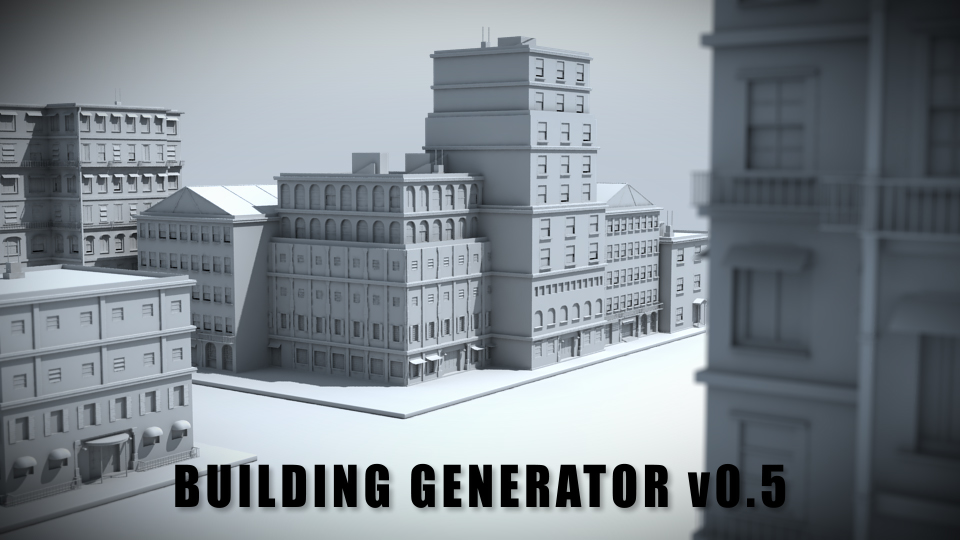
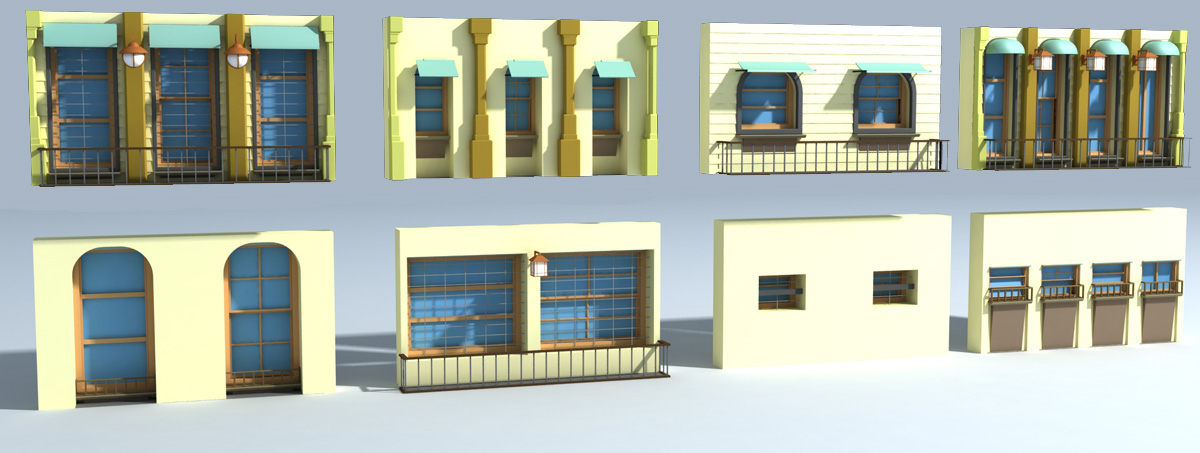
Tyson Ibele, over at http://tysonibele.com/ has released the latest version of his Building Generator for 3D Max 9 and above. Development has been swift with the addition of textures a couple of weeks ago and now a notable update to the creation of windows/details on the buildings.
With the creation of digital cities the 'detail' is crucial, from shutters on windows to lights and blinds, they all add up to create a sense of place. We have not had chance to run the latest version yet as its just been released, but if its anything like the previous iterations it is one of the 'must' have scripts for building digital cities.
The procedural buildings generator from http://www.tysonibele.com/ has eaten up quite a lot of our free time in the week since its was released. With updates coming thick and fast it now includes automatic texture creation complete with an included texture pack.
If digital urban gave out awards, this plugin would win a big shiny gold one, fantastic stuff and so refreshing to see this level of quality without an equally high price tag.
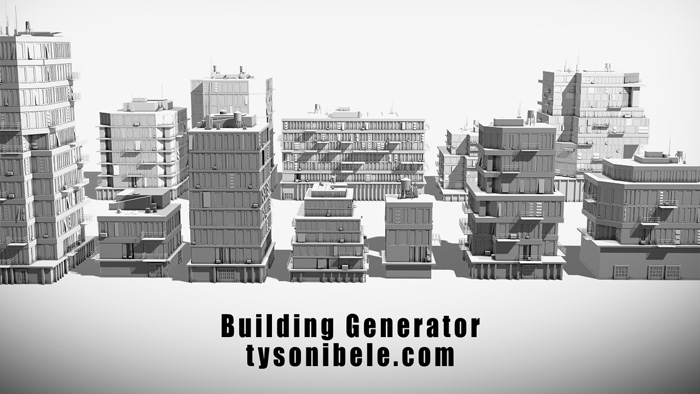
Procedural building generators are few are far between so when one comes along that is not only powerful but also free it is well worth our attention. Tyson Ibele, over at http://tysonibele.com/ has released version 1.5 of his Building Generator for 3D Max 9 and above.
The clip below provides a glimpse of its output:
We are going to give it a spin later today - you can download Building Generator free via: www.tysonibele.com.
Thanks go to Karel Airapetjan for emailing us in the link.
Our work on Unity stalled for a while due to another projects and deadlines, but we are back on the case from next week with the aim of providing a quick and easy route to visualise agent based models with an urban theme .
The movie below details where we left off:
The ultimate aim is go from popular agent based modelling packages such as NetLogo or Repast into 3D Max and subsequently out to a game engine.
The movie below shows basic agent based models created directly inside of 3D Max:
The CityEngine is a unique professional tool for creating, visualisating and exporting cityscapes. As such it is of notable use to the games industry with a quick and easy route into either 3D Max or the Unity Engine.
Unity supports a number of input formats, allowing for direct integration with the CityEngine with the following features:
* Direct model export to Unity via Autodesk FBX including textures - thus, generate'n'play your environment with a few clicks only. * Arbitrary mesh granularities such as per-material groups or editable scene nodes are possible thanks to CityEngine's various export options such as "merge by material" or "single node objects". Most of these options are supported by Unity. * Collider meshes (almost) for free: The CityEngine's CGA shape grammar is a perfect tool to generate and control low-res collider meshes in Unity (and they always adapt to model iterations).
The video below demonstrates a CityEngine-Unity-workflow.
It is impressive how easy it is nowadays to create buildings/cities and visualise them direct via a game engine...
Rammy Elsaadany, a Masters of Architecture student at the Bartlett school of architecture, has just completed a collaborative film with Bruce Damer about the proposed EVOGRID project.
The film connects together a simplified version of the scientific narrative and also a conceptual development of what could possibly happen once the EVOGRID project is established. Rammy used a variety of techniques to achieve this film, including 3d modeling, compositing, and green screen. The software used includes 3D Max, After Effects, Premiere and Sound Booth.
Take a look at Rammys YouTube channel for more work, he is currently working as a freelance so if any of you out there need one of the best new urban animators do get in touch with him.
Crowd, transport and urban simulations are at their roots down to 'Agents' or 'Objects' that are assigned a set of rules as to how to moves in relation to both the environment and other agents around them. 3D Studio Max has a built in 'Crowd and Delegate' system which can be used to assign behaviour and therefore create realistic traffic of pedestrian systems in 3D space.
The movie below displays our first tentative steps to explore emergent behaviour via the introduction of simple rules. The movie starts out with a basic 'wander' behaviour where the agents only knowledge is the shape of the surface. Moving on we assign each of our 'cubes' (of which we have become quite fond of...) a level of vision so they can see ahead and therefore avoid each other and objects in their environment.
Thirdly, the agents seek a 'sphere' which could be viewed as a source of food. While being aware of each other and tweaking the way the cubes move a swarm behaviour emerges. Finally, we introduce competing groups with two priorities, firstly to eat and secondly to stay as a group. The majority choose the group over the food but a couple stray off in search of sustenance and lose the other members.
All of these models are going into our exhibition space previewed below to allow a step by step guide to the principles of agent based modelling.
The virtual exhibition space should be online for Windows and Mac in the next few weeks.
A few months ago readers may remember we posted a series of movies produced using output from NetLogo direct in 3D Max - examples included the flocking simulation above and the basic traffic model below:
Both proofs of concept the source code and a tutorial are now available the Crowd Simulation Blog by the Ateen Patel a PhD student at CASA. Ateen has written a short tutorial (including the code) and several other posts on how to get information from a simple NetLogo Traffic Model and visualise it in 3D Max from Autodesk.
NetLogo is a cross-platform multi-agent programmable modeling environment that is widely. It is particularly well suited for modeling complex systems developing over time. Modelers can give instructions to hundreds or thousands of independent "agents" all operating concurrently. This makes it possible to explore the connection between the micro-level behavior of individuals and the macro-level patterns that emerge from the interaction of many individuals.(Nation Master Encyclopedia).
CASA, home of digital urban, has a few blogs of note now, the Crowd Simulation Blog is defiantly worth keeping an eye on for those interested in pedestrian modeling...
The movie below is a visualisation of office and retail space in London. Using data kindly supplied by the Economics Unit at the Greater London Authority, Duncan Smith a PhD student here at CASA has calculated the amount of retail and office in London per 500 metre grid square:
Duncan carried out the analysis in ESRI's ArcScene as part of his PhD. Intriguingly it is possible to export from ArcScene into Autodesk's 3D Studio Max allowing a much higher level of visual fidelity. Of course once it is in max you can then export to a number of other platforms, such as Unity as our previous post explained using the same data.
Here at CASA we have just completed the initial phase of our London database, as such we will be exploring more ways to visualise city based datasets in forthcoming posts.
A while ago we ran of posts on importing into models into the Crysis Sandbox - ranging from models direct from the 3D Warehouse such as the Tate Modern below and the following city model direct out of our Greeble Tutorial in 3D Max:
Greeble City in Crysis:
Progress via 3D Max 9 was swift with a few hoops to jump through but an export route that generally worked, embedded below is an example featuring the Swiss Re, Tower Bridge, London in the Sandbox:
The potential of using Crysis for both urban and landscape visualisation is well known and with the introduction of various modifications such as the 'Natural Mod' below we thought it was timely to take a new look at Crysis:
Sadly we have to report that the importers do not seem to of improved all that much, the latest version of 3D Max is incompatible with the previous plugins and we have failed to get the SketchUp to Crysisplugin work at all.
That said it is well worth taking a look at theSketchUp to Collada direct export thread at Cryteks Official Modding Portal as well as a free plugin from PlayUp for SketchUp that allows models to be exported to both Crysis and the HalfLife engine.
We are almost tempted to go back to modding Oblivion which was relatively straight forward:
The point of this post? Part frustration at the number of hoops still to be jumped through and high end software required to modify games such as Crysis. We know that its still a thriving scene and we have shown its possible to go from the Google 3D Warehouse to the game engine, its just annoying it is still a slightly painful route.
The addition of physics into a 3D scene takes away a lot of work required for traditional 'handmade' animation, it also allows amazing videos to be made such as as the one by http://www.freakymicky.de/ above...
Our Greeble City Tutorial provides a walk through on how to quickly and easily create a cityscape, complete with custom skyscrapers. Creating a city is all well and good but it is the fine details that brings a 3D city to life, the first of these is the road network.
Creating a road network in 3D Max is to be honest a tedious process but once they are in place complete with pavements (sidewalks) a basic render can begin to look more city like.
The renders here are from our 'City Roads Package' which is now available as a free download for 3ds MAX, courtesy of us here at digital urban. Complete with 38 high resolution textures the pack includes a series of objects that will snap together to create a grid or path layout.
Note as a temporary measure the file has been removed due to issues with the textures, we are working hard to resolve this and a new updated file will go online as soon as possible. For the time being a non texture mapped version is available here (.zip file) - it should still be of use as the roads can be snapped togehter to quickly make a city layout for use in our Greeble City tutorial.
If you do use the package we would love to include a render on the blog so do let us know.
The next step in our visualisation of agent based models is a simple flocking example.
This model is an attempt to mimic the flocking of birds, while the resulting motion also resembles schools of fish. The flocks that appear in this model are not created or led in any way by special leader rather, each bird is following exactly the same set of rules, from which flocks emerge.
We have exported the model into 3D Max providing the visualisation below, as ever these are early days but the results seem to run well with 300 'birds' over 1000 frames. The birds are rendered as cubes at the moment for proof of concept:
The birds follow three rules: "alignment", "separation", and "cohesion". "Alignment" means that a bird tends to turn so that it is moving in the same direction that nearby birds are moving. "Separation" means that a bird will turn to avoid another bird which gets too close. "Cohesion" means that a bird will move towards other nearby birds (unless another bird is too close). When two birds are too close, the "separation" rule overrides the other two, which are deactivated until the minimum separation is achieved.
The three rules affect only the bird's heading. Each bird always moves forward at the same constant speed.
If we were using the built in Crowd and Delegate system a true 3D flocking system would be possible, but it would be pure visualisation, by importing via NetLogo you gain access to the raw data and thus spatial analysis is possible. It is also quick to model and provides the best of both worlds - 3d visualisation and complex modelling.
How does this relate to the city? The next part is to put in real geographical data and to get the agents movies and reacting to each other on a spatial network, more on that to come.
You can download NetLogo from here, its comes with a excellent tutorial so you can start building your own model.
Its early days so the results are developing, but it does make an interesting city animation, make them bubbles, add in a real city and you almost have an advert hidden somewhere in there.
Still, we thought we would post it anyway as it shows what the default 'SuperSpray' and 'Shockwave' settings in 3D Max yield. With the addition of some havok physics, a real city and some wind flow dynamics the results may be interesting (?)
Rammy Elsaadany, a Graduate Diploma student in Architecture at the Bartlett, University College London has integrated parts of our Virtual London model into his final project movie.
Using a mix of 3D max and After Effects, Illustrator and various other software packages he has produced the following visualisation entitled 'Simulated Freedom':
Its refreshing when a student takes away your model and comes up with such an intricate sequence.
Simulating traffic is a science in itself with each car acting as an agent that is aware of its surroundings. It is notoriously difficult to create convincing traffic flow in 3D packages without input from specialist simulations and as such its a good challenge for our recent explorations of using agents in 3D Max to populate city models.
New Scientist highlighted the 'Shockwave' theory of traffic simulation this month with an article on how a team of Japanese researchers has recreated the phenomenon on a test-track for the first time.
The mathematical theory behind these so-called "shockwave" jams was developed more than 15 years ago using models that show jams appear from nowhere on roads carrying their maximum capacity of free-flowing traffic – typically triggered by a single driver slowing down.
With simple agents in 3D Max our first movie interestingly produces similar results:
If you then set up 'three teams' linked to a network with behaviour based on varying speed and avoidance calculations you can create a basic traffic flow simulation.
As we have said, these are first steps and there are some obvious issues to iron out with the aim to import the traffic flow into scenes such as our 'Greeble City Tutorial' model illustrated below:
Interestingly the work going on just to our left using the Crysis game engine for traffic flow is proceeding at a notable rate, we should have a movie of this tomorrow...
Yesterday we posted about roads in 3d models and how small details begin to bring the 3d city to life. The same goes for pedestrians and modes of transport, in essence these objects populate the city and add a significant level of realism.
Crowd and transport simulation is at its roots down to 'Agents' or 'Objects' that are assigned a set of rules as to how to moves in relation to both the environment and other agents around them. 3D Studio Max has a built in 'Crowd and Delegate' system which can be used to assign behavior and therefore create realistic traffic of pedestrian systems in 3D space.
Our movie below displays our first tentative steps using the system to create an 'Ant Like' behavior on a surface:
Ok its far from a crowd in a city but the principle is there. We don't often put up 'early development' movies but this should be an interesting learning curve for anyone wanting to populate a 3D City. At the same time as using 3D Max we are also using Crysis for realtime agent based modelling, more on that a little later...
If you would like to know more about Agents take a look at http://gisagents.blogspot.com/ - a blog written a mere two desks away from where we are currently sat...
Our Greeble City Tutorial provides a walk through on how to quickly and easily create a cityscape, complete with custom skyscrapers. Creating a city is all well and good but it is the fine details that brings a 3D city to life, the first of these is the road network.
Creating a road network in 3D Max is to be honest a tedious process but once they are in place complete with pavements (sidewalks) a basic render can begin to look more city like.
The three renders here are from our 'City Road Pack' which we will be uploading to TurboSquid or some other file sharing site free of charge. This should save anyone wanting to build a quick city having to go through the two day process of making roads. The pack will include a series of objects that will snap together to create a grid or path layout.
Soon as its ready to go we will put up a post, in the meantime if there are any other parts of cities that people would like to see let us know via the comment box.
We should also have a post on roads and agent based traffic simulation in Crysis later this week as well, the main Crysis tutorial has been delayed due to a 'shadow bug' in the latest build. Soon as this is fixed we will put the SketchUp/3D Max to Crysis tutorial online.
























 One such known example is the London Twitter map by UrbanTick, developed using the data collector created by Steven Gray and imported by Fabian into ArcMap, it developed a style of its own as the 'NewCity Landscape' collection. From a digital urban point of view the next stage of the map is a 3D extension, a transformation that proved surprisingly difficult due to the nature of combining the worlds of traditional GIS and game engines such as Lumion.