CityDashBoard TalesofThings MapTube
Qrator Tutorials About Digital Urban
MRes ASAV SurveyMapper Contact Us
Showing posts with label Unity. Show all posts

2011-12-15

Lumion, Unity, Agents & Objects

Crowd, transport and urban simulations are at their roots down to 'Agents' or 'Objects' that are assigned a set of rules as to how to moves in relation to both the environment and other agents around them. 3D Studio Max has a built in 'Crowd and Delegate' system which can be used to assign behaviour and therefore create realistic traffic of pedestrian systems in 3D space.

The movie below displays our first tentative steps to explore emergent behaviour via the introduction of simple rules. The movie starts out with a basic 'wander' behaviour where the agents only knowledge is the shape of the surface. Moving on we assign each of our 'cubes' (of which we have become quite fond of...) a level of vision so they can see ahead and therefore avoid each other and objects in their environment.


Crowd and Delegates - Emergent Behaviour from digitalurban on Vimeo.


Thirdly, the agents seek a 'sphere' which could be viewed as a source of food. While being aware of each other and tweaking the way the cubes move a swarm behaviour emerges. Finally, we introduce competing groups with two priorities, firstly to eat and secondly to stay as a group. The majority choose the group over the food but a couple stray off in search of sustenance and lose the other members.

Previous steps in our visualisation of agent based models are based around a simple flocking examples. This model is an attempt to mimic the flocking of birds, while the resulting motion also resembles schools of fish. The flocks that appear in this model are not created or led in any way by special leader rather, each bird is following exactly the same set of rules, from which flocks emerge.

We have exported the model into 3D Max providing the visualisation below, as ever these are early days but the results seem to run well with 300 'birds' over 1000 frames. The birds are rendered as cubes at the moment for proof of concept:


Flocking in NetLogo exported to 3D Max from digitalurban on Vimeo.

Music "Funkmelon Blooz" (Electronica)

The birds follow three rules: "alignment", "separation", and "cohesion". "Alignment" means that a bird tends to turn so that it is moving in the same direction that nearby birds are moving. "Separation" means that a bird will turn to avoid another bird which gets too close. "Cohesion" means that a bird will move towards other nearby birds (unless another bird is too close). When two birds are too close, the "separation" rule overrides the other two, which are deactivated until the minimum separation is achieved.

The three rules affect only the bird's heading. Each bird always moves forward at the same constant speed.

If we were using the built in Crowd and Delegate system a true 3D flocking system would be possible, but it would be pure visualisation, by importing via NetLogo you gain access to the raw data and thus spatial analysis is possible. It is also quick to model and provides the best of both worlds - 3d visualisation and complex modelling.

While 3D Max is of use for crowd and particle simulation when it comes to modelling complex systems an external package is required, such as NetLogo. The movie below details our first steps at CASA (home of digital urban) to export a basic traffic model from NetLogo into 3D Studio Max. The import script was written by our new PhD student, Ateen Patel and opens up a vast array of opportunities to both visualise and model the city.


Music by The Tedd-Z Cookbook, Aerodrome (Funky Shuffle Remix)

NetLogo is a cross-platform multi-agent programmable modeling environment that is widely. It is particularly well suited for modeling complex systems developing over time. Modelers can give instructions to hundreds or thousands of independent "agents" all operating concurrently. This makes it possible to explore the connection between the micro-level behavior of individuals and the macro-level patterns that emerge from the interaction of many individuals.(Nation Master Encyclopedia).

How does this relate to the city? The next part is to put in real geographical data and to get the agents movies and reacting to each other on a spatial network, more on that to come. Perhaps using a particle system as per the movie below:


Particles in the City from digitalurban on Vimeo.

All of these models are going into our exhibition space to allow a step by step guide to the principles of agent based modelling. At the moment we are weighing up two options - Unity and Lumion. Our previous trials in Unity are below:


Unity is great, it is a fully featured game engine, however we are also looking at Lumion. Lumion, aimed more at direct visualization, is remarkably easy to learn, the movie below is the result of our first 20 minutes working with Lumion from first load to final output. It is merely proof of concept, but taking the output from Max and dragging into Lumion is refreshingly simply:


We will have more on Lumion in future posts...

2011-10-27

Augmenting a Roman Fort: A Paper Model, IPad and Unity

Stuart Eve here at The Bartlett's Centre for Advanced Spatial Analysis has posted an update on his PhD research looking at augmenting archaeological sites. Before moving onto the real world he has built a proof of concept based on a Roman Fort made out of paper, the results on the iPad are extremely promising:


Augmenting a Roman Fort from Dead Men's Eyes on Vimeo.

Stuart has a full write up on the tools used over on his blog..

2010-03-10

Unity 3.0 Announced

Hopefully we are about to dive back into the Unity game engine for a truly exciting project, as such the glimpse of Unity 3 opens up a number of possibilities:

Dark Unity from Unity3D on Vimeo.


As soon as we are back using Unity we will of course post the usual update movies and tutorials. Keep an eye on http://unity3d.com/ for full details.

Thanks go to Chester of http://associated-architects.com/ for the link.

2009-11-02

Unity - Now Free

Unity, our current development platform of choice here at digital urban, is now available free of charge. The Indie version of its Unity engine previously sold for $200 and is quite simple one of the best and indeed easiest game engines to work with.

We will be ramping up our Unity development in the coming months, for now if you haven't had chance to use Unity yet, what are you waiting for.

Head over to http://unity3d.com/unity/ for the download.

Thanks to everyone who sent this in...

2009-09-18

NetLogo and Repast to 3DMax to Unity: ABM Visualisation

Our work on Unity stalled for a while due to another projects and deadlines, but we are back on the case from next week with the aim of providing a quick and easy route to visualise agent based models with an urban theme .

The movie below details where we left off:


The ultimate aim is go from popular agent based modelling packages such as NetLogo or Repast into 3D Max and subsequently out to a game engine.

The movie below shows basic agent based models created directly inside of 3D Max:

Crowd and Delegates - Emergent Behaviour from digitalurban on Vimeo.


Finally, below is output from NetLogo visualised in Max - this is now up and running in Unity so the proof of concept seems to work:

Flocking in NetLogo exported to 3D Max from digitalurban on Vimeo.


All being well we should have a plugin for 3D Max available in the next quarter allowing direct input for agent based models.

2009-07-21

CityEngine to Unity: Rapid City Modelling for Game Engines

The CityEngine is a unique professional tool for creating, visualisating and exporting cityscapes. As such it is of notable use to the games industry with a quick and easy route into either 3D Max or the Unity Engine.

Unity supports a number of input formats, allowing for direct integration with the CityEngine with the following features:

* Direct model export to Unity via Autodesk FBX including textures - thus, generate'n'play your environment with a few clicks only.
* Arbitrary mesh granularities such as per-material groups or editable scene nodes are possible thanks to CityEngine's various export options such as "merge by material" or "single node objects". Most of these options are supported by Unity.
* Collider meshes (almost) for free: The CityEngine's CGA shape grammar is a perfect tool to generate and control low-res collider meshes in Unity (and they always adapt to model iterations).

The video below demonstrates a CityEngine-Unity-workflow.


It is impressive how easy it is nowadays to create buildings/cities and visualise them direct via a game engine...

See http://www.procedural.com/ for full details.

2009-07-15

Unity: Project Double Zero


Project double zero is a FPS running in the Unity game engine, the project is being developed collaboratively by several interested parties. The driving force behind the project is Thomas P who is documenting progress via YouTube and their blog. The first movie below provides an insight into developing a level in Cinema 4D and then importing into Unity. The C4D development is broadly similar to 3DMax/Maya/Blender techniques:


The second movie details the latest progress:


Our own work with Unity is on going, below details progress to date:


Obviously with architecture, agent based modelling, urban design and planning based visualisation we have had to 'lose the gun' aspect of a FPS but in terms of development and concepts the work is similar. We should have a release out the door in the next few weeks...

See http://blog.projectdoublezero.com/ for full details on Project Double Zero, its one to watch...

2009-06-08

Unity: Nordhavnen City Visualisation


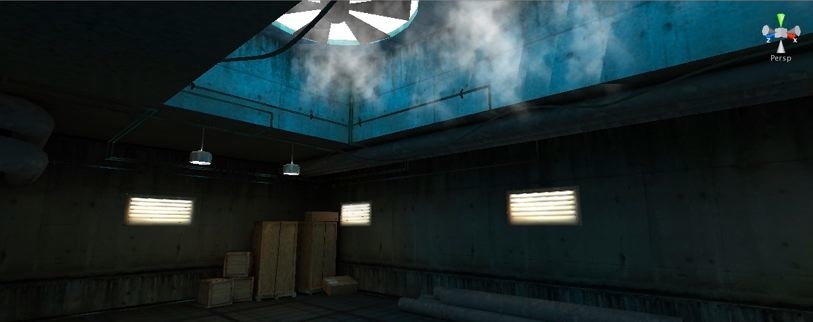
We have been using Unity a lot ourselves recently as it provides a rapid way to visualise architecture and cityscapes. The movie above is running in Unity, detailed a real-time demo of Nordhavnen a city area located in Copenhagen, Denmark.

We especially like the change in scale halfway through the clip and the ability to change the shading on the buildings according to underlying data. The demo is developed by Utopian City_Scape who specialise in real-time visualisation of large city areas

See http://www.utopiancityscape.com for more information

2009-05-29

Unity, SketchUp, LightUp and Max: Progress Movie


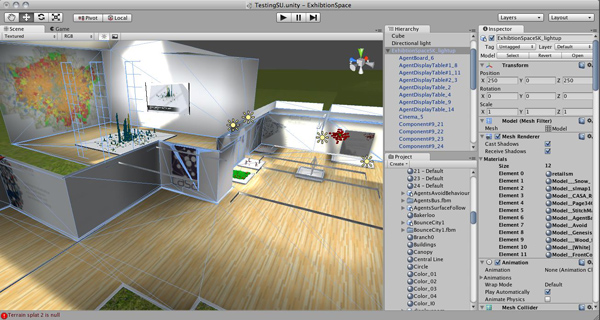
We have been working on the new exhibition space for the city and agent based modelling work here at CASA for around 4 days. Our development path has changed in favour of SketchUp with LightUp plugin for the rooms layout and 3D Max for the agent based models. The movie below shows progress so far running in Unity:


You can view the previous example, built as a proof of concept for Windows and Mac from here.

2009-05-27

Unity Progress

Apologies for the lack of posts today - its all due to the screen shot above. A mix of SketchUp/LightUp, 3D Max and Unity have eaten up our day as we develop the exhibition space for the latest work.

The movie below take a look at the model so far in Unity - the 3D agents are via Max, the room layout and lighting are from SketchUp:

Progress in Unity: SketchUp and 3D Max from digitalurban on Vimeo.


We seem to have a reasonable workflow in place, all we need now is to build some more crowd/delegate models in Max, tweak the lighting, add a fantasy city section, work out how to do panoramas and its ready to go - hopefully next week...

2009-05-07

Digital Urban City Exhibition Space: Downloadable Preview

The following exhibition space is a proof of concept, looking at the ability to share and display city datasets and simulations within an interactive game engine. Available for download on both the PC and Mac (intel) platforms the space is the result of a few days work with the Unity Engine, it is intended to be viewed in the spirit of development rather than a completed product.

The room includes our first 'crowd and delegate' models direct from 3D Max, created as basic wander and avoid simulations they provide the building blocks of emergent behaviour within the cityscape.

City wide data sets can to be honest be very 'dry', the whole point of digital urban is to look at new ways to outreach, visualise and ultimately communicate urban data. The ability to include 3D models via ESRI ArcScene is a notable step forward, pictured below is the retail and office space in London measured on a 500m grid. We note some polygon issues here but these are known and we think we have a way to fix them - its to do with the way ArcScene exports, the model forms the centre of the exhibition space:

The room features various architectural models, including the Swiss Re building and the GLA in London, it also features a number of our latest output movies, the London LiDAR and Second Life Agents are of particular note.

The model is, as we mentioned, proof of concept, the next step is the addition of themed rooms and a more organised structure. We think the concept of virtual exhibition spaces is a strong one, so as ever any comments are most welcome, if you would also like to know how any of it was done just ask, as is the spirit of digital urban.

Download the model for Windows XP/Visa (221 Mb zip file)

Unzip the file, open the folders and run the Exhibition1.exe file.

Download the model for Mac (Intel) (222 Mb zip file)

Extract and simply run the .dmg file.

We recommend running the application in 'Window' mode at 1024 x 768: use the mouse to look around, W/S move forwards/backwards, Space to jump, click and drag the digital urban cube to throw it around...

2009-05-06

Unity: Creating a City Exhibition Space - Update 2

Regular readers will know that we have spent the last few days giving the game engine Unity a spin. The pro version has various additions to the lower cost indie edition, most notably for our use the ability to import movies as textures and use dynamic shadows. Our movie below provides an update on progress:

Unity: Creating a City Exhibition Space - Update 2 from digitalurban on Vimeo.


If people are interested we can post the executables to walk around, we now plan to add a number of rooms and create a full city exhibition space.]

*Update - The preview room is now available in Windows and Mac versions from here.*

2009-05-01

Unity: City Data and Simulation Exhibition Space - A Work in Progress

We have spent the day giving the Unity Game Engine a spin and to be honest we are really impressed. The interface is simple to use and the ability to drag and drop files direct from 3D Max/Maya/Blender etc is refreshing. We have been able to import various simulations into a city exhibition space, a process that would taken of a good few days using other game engines.

By way of a work in progress we have a new video below:


We will have more next week... any thoughts, comments or questions are of course welcome...

2009-04-29

Unity Game Engine for Architectural Visualisation: A First Look

This is our first look at Unity - an integrated authoring tool for creating 3D video games or other interactive content such as architectural visualizations or real-time 3D animations. The editor runs on Windows and Mac OS X and can produce games for Windows, Mac, Wii, or iPhone platforms. It can also produce browser games that use the Unity web player plugin, supported on Mac and Windows.

We have spent the morning dragging and dropping files into the interface for direct viewing in the game engine. In short, we are impressed at the shear ease of use, within 15 minutes we had our both our 3D Tube Map and Greeble City complete with sky box, lighting and first person viewpoint up and running:


For anyone used to having to jump through various hoops to get models into a game engine Unity is quite simply a breath of fresh air. There are two main licenses: Unity Indie ($199), and Unity Pro ($1499). Unity Pro is required for businesses with over $100,000 turnover/year.

Our movie was produced via the 30 day trial of the Indie version, we will be taking a closer look at Unity over the coming weeks, for now see http://unity3d.com/unity/ for more information.

2009-04-13

Unity Game Engine

Wikipedia describes Unity as an integrated authoring tool for creating 3D video games or other interactive content such as architectural visualizations or real-time 3D animations. Unity is similar to Director, Blender game engine, Virtools or Torque Game Builder in the sense that an integrated graphical environment is the primary way of authoring the game.

The editor runs on Windows and Mac OS X and can produce games for Windows, Mac, Wii, or iPhone platforms. It can also produce browser games that use the Unity web player plugin, supported on Mac and Windows.

The movie below by 3dnemo provides an insight into the possibilities:


Version 2.5 now supports the ability to drag and drop .max files right into the Editor, including support for all skeletal based animation, multiple UVs, and vertex colors. This builds on the existing support for Maya, Blender, and all other 3D applications that integrate with the latest FBX plugin on the Windows platform.

There are two main licenses: Unity Indie ($199), and Unity Pro ($1499). The Pro version has additional features like render-to-texture, postprocessing effects, and the ability to build standalone Windows games. Unity Pro is also required for businesses with over $100,000 turnover/year.

The second movie, again by 3dnemo , illustrates a cityscape running within Unity:


We will be taking a closer look at Unity over the coming weeks, for now see http://unity3d.com/unity/ for more information.

Thanks go to an anonymous commenter in our post on hyperShot: Near Realtime Rendering System for Windows and Mac for mentioning Unity...

Update - See our Sample City Exhibition Space in Unity for Windows and Mac.