The ability to add a 'one shot' panoramic lens to a digital camera has been around for a while and although the combination works it is unwieldy to carry around. Bubblescope have taken the 'One Shot' lens method and built a camera around it - resulting in world’s first standalone, single-shot panoramic digital camera for capturing experiences as 360º x 104º. Using BubbleScope® 1.0 software on a PC and Mac the resulting images can be converted to QTVR movies.
Bubblescope does seem to be to the simple solution for one click panoramas. The resolution maybe low(ish) and the rig doesn'tcompete with traditional giga pixel panoramas made with multiple images but for being out and about it captures the world in 360 degrees.
To be honest we want one!
Take a look at the BubbleScope website for more info, the camera will be available to order shortly..
Welcome to the second part of the tutorial aimed at providing a step by step guide to importing models into the Oblivion Engine. Part 1 detailed the setting up of your first environment, leaving you with an empty flat plain of land on which to import models as we illustrate in the YouTube movie below:
There are a number of newly emerging paths into Oblivion - most notably via the free version of Google SketchUp and Blender, we will be covering these over the coming weeks. This tutorial is aimed at exporting from SketchUp Pro to 3D Max and finally into Oblivion although any import method into 3D Max will work.
For this tutorial you will require:
1) SketchUp Pro - A fully functional 8 hour version can be downloaded from here.
2) 3D Studio Max - A 30 Day fully functional trial can be downloaded here.
3) Nif Tools Exporter for 3DMax - Blender and Maya are also available from here.
4) Convim - A image conversion package to convert files to the .dds format allowing you to import textures. Download via the Convim site.
5) A 3D Max script to change image settings - Part of the BlurScripts pack which can be downloaded here (zip file).
In our case we will be converting our model of the Quad at University College London to Oblivion - this is used as an example due to it high number of textures allowing us to detail how to process complex models:
Step 1
Open or create your model in SketchUp and export to the .3DS format. Ensure that the model is exported as a single object with generate cameras unticked.
Step 2 Download the Nif Tools Exporter for 3DMax and extract the two files - NifPlugins.dlu to the 3D Max Plugins directory and MaxNifTools.ini to the Max Plugcfg directory.
Step 3 Download the Blur Scripts file and extract the folder 'BlurScripts' into your Max Scripts directory.
Step 4
Import your model into 3D Max choosing to 'Completely replace current scene'. You should see your model within 3D Max:
Step 5
Make sure your model is grouped into a single mesh. If not group your object and then right click 'Convert to Editable Mesh'.
Step 6
We need to find and replace all the texture file names within 3D Max to the .dds extension (the format that imports into Oblivion). Click 'MaxScript'/'RunScript' from the top tool bar. Navigate to the BlurScripts folder and select 'ChangeBitmaps'.
In our case we want to change .jpg to .dds for the files we will create later using Convim. Type .jpg and .dds into the relevant dialogue boxes as pictured above and click 'Change Bitmaps'.
Step 7 Export the file in Nif format - Click 'File\Export', select File Type Netimmerse.Gamebryo .kf .nif. Navigate to your Oblivion folder and then onwards to \data\meshes. Type in your model name, in our case UCLQuad.Nif and click 'Save'. An export box will appear as pictured below:
Select the options as pictured and click 'Export'. You model is now saved in the .nif file format ready for import into Oblivion.
Step 8
Before we import into Oblivion we need to convert the texture files to .dds format. Open Convim and select your model texture location on the left using 'All'. The file conversion should be set to DDS DXT1 Texture with the folder path to Oblivion\Data\Textures as pictured below:
Click 'Convert' - you now have the model and the textures in the correct format ready to import.
Step 9
Open the Elderscrolls Scrolls Construction Set and select 'File\Data'. We will be using the files created in Part One of this tutorial - in our case we created DigitalUrban.esp. Firstly double click Oblivion.esm and DigitalUrban.esp (or your file name) a cross will appear next to the files. With your file name highlighted click 'Set as Active File' this ensures that your world loads correctly into the construction set. Click 'OK' and your world will load.
Step 10 All we now need to do is simply open our World Space and import a new object. In Cell View scroll down until you find your worlds file name - Select it (again in our case Digital Urban) and double click in Cell1 where we will see the tree we placed in the first part of the tutorial. Double click the tree and then click the 'Lightbulb' icon in the top tool bar to ensure you can see it.
You screen should now look as illustrated below:
In the Object Window - on the left - select 'Static' and right click on any object name in the list, Select 'New' and type in a ID into the option box, in our case UCLQuad. Click 'Add Nif File' and choose your model saved out of 3DMax. Click Ok.
The model is now ready to be added to the scene.
Step 11
Scroll down the list until you find your newly created ID file - click and drag it into the render window next to your tree. You model will now appear fully texture mapped into the editor:
Finally - Click 'Save'.
Step 12
Launch Oblivion - you are now ready to view your world. Select 'Data Files' from the Oblivion start screen. A menu will appear allowing you to load your new world. Select 'Oblivion.esm' and 'YourWorldName.esp' - ours is DigitalUrban.esp. Click 'OK' and Play' from the main menu.
The YouTube Movie below demonstrates our final world created by following the above steps:
Note that when the world first loads the graphics are flicking and the sky is displaying errors.
This is easily fixed by:
Step 13
Press the key next to 1 on most keyboards labelled '¬' or '~' this allows console commands to be entered. Type 'TS' and then 'Press Enter' now repeat and you will see that the sky is now correctly turned on. There are a number of commands you can use in this mode to turn functions such as Flying, God Mode and Weather Effects on and off, see GameSpots guide for a full list.
Step 14
Press 'T' to allow you to advance in time - towards daylight, select 10 hours.
Your world is now complete and navigable within the Oblivion Engine. Use W/S to move forwards and backwards, A/D to move left and right. Press 'R' for a third person viewpoint.
We hope that the path from the first movie in the tutorial towards the image of the Quad in SketchUp and finally the movie of the Quad in Oblivion makes the point of how powerful game engines can be for visualisation...
The concept of time introduces the fourth dimension to city models. Recent history can be reconstructed from photographs or prints but this is often a slow manual process.
Technology capable to identify photographs according to vantage point and linking them in a three dimensional interface is about to reach the market in the form of Microsoft's Photosynth. If you take this a step further and link photographs over time with an enhanced 3D view rather than Microsoft's point cloud then you approach the 4D Cities Concept of Grant Schindler a Ph.D. Student, Georgia Institute of Technology, College of Computing.
The YouTube movie below provides an insight into the project:
In an article in New Scientist Frank Dellaert at the Georgia Institute of Technology in Atlanta, who built the system with his colleague Grant Schindler and Sing Bing Kang of Microsoft's research lab in Redmond, Washington states that: "The system shows the city changing over time as old buildings are demolished and new ones are constructed," says Schindler. "You'll be able to see what the view out of your window looked like 100 years ago."
It is well worth taking a look at Grant's webpage at the Georgia Institute of Technology - especially the 4D Flythrough.
Microsoft is currently ahead in the battle to produce 3D city from models from the air see our post and movie on New York in Virtual Earth.
The current move is towards street level with Google's Street View continuing its capture programme and new kid on the block EveryScape launching soon.
We now have 'Earthmine' aiming to create a new kind of map:
While writing the second part of the tutorial on Oblivion a reader known as Uwe posted a comment with regards the a plugin for the free version of Google SketchUp which allows model export to the .stl format.
The main drawback of the free version is its inability to export models until now - if you install the LTS Plugin it suddenly frees up the ability to export models direct from SketchUp.
As such we thought we would give it a try importing a model from the Google 3D Warehouse into Oblivion, the movie below details the steps:
As you can see we are able to take geometry direct from the 3D Warehouse and import it into Oblivion via 3D Max and The Elder Scrolls Construction Set although at the moment the textures get lost along the way.
Our main tutorial will be online later tomorrow (all things going well) with an update on this new method as soon as a full export path is determined.
Thanks again to Uwe - as we run through the notes on the second tutorial for the write up tomorrow its interesting to note how this opens up a completely free path from various software packages to Oblivion.
The model is describved by J-Wall as: 'A large square island is divided into quarters by two large boulevards. On the west side of town is the Capitol, a 1052 foot tall granite building flanked by gardens. The central tower is topped by a huge 4-sided clock and a spire with a gold-covered star over all. As mandated by Imperial law, the Capitol is the tallest building for 5 miles around. At the north end of town lies Military Plaza, a large field, which, with all seats used, can seat 100,000 people. Immediately west lies the sports complex, which is comprised of one "arena" and one stadium. At the southern end of this boulevard is the Monument to Our Fallen Soldiers, a large bronze statue of a soldier wielding a rifle.
The southeast corner of town is home of the main parking garage; other conveyance is provided by the ultra-clean "mag-lev" subway system. At the opposite corner lies an old coal-fired power plant; it is hardly used due to abundant alternative fuel sources. The south boulevard is home to an opera house and concert hall. Several large apartments and rowhouses are scattered over the town; the southwest side of town is home of several single houses from a failed urban renewal plan. The First House is technically in the central tower of the Capitol; however, the ruler actually lives in the large yellow-and-stone house. Several corporate offices, including one of a large plumbing-supply chain (it looks like a giant toilet, or maybe the Guggenheim in New York) are scattered throughout the town.
If the hype is to be believed then Universities are scrabbling to get into Second Life with the aim of attracting students and setting up virtual collaborative environments. Systems such as Second Life and ActiveWorld’s are notable for their potential to both change and enhance not only the teaching environment but also Universities outreach activities. At least that’s what you would be led to believe until you begin speaking to the people on the ground.
We have been using various virtual world systems since the launch of ActiveWorlds in 1995. Teaching students in both New York and London simultaneously gave us an early insight into the potential of these environments for collaborative lectures. Since then Second Life has come along and grabbed the headlines with its rich environments and ability to set up your own ‘Island’ on which to build. Both OxfordUniversity and Edinburgh have recently released their own VirtualIslands with lecture halls and learning centres. For an insight in how Universities are using Second Life take a look at the Campus at OhioStateUniversity:
Yet mention Second Life in many academic circles and you will be greeted with cries of derision and a snub for wasting your time looking into such trivial activities. Indeed having just come back from a conference where I dared suggest the use of Second Life for e-science outreach in the UK I was left feeling slightly socially inept for using such environments for research. The reaction by one member of the academic community was indeed towards the side of anger with regards my view that such worlds can be used for distributed teaching and collaboration on papers.
We therefore require a step back – Oxford have recently launched their own Second Life campus but just talking to some of the people asked to use it I have serious doubts on its take up – and this is from an academic community that should be embracing such developments.
Of course Universities shouldn't jump on the Second Life bandwagon for the sake of it but neither should they dismiss it out of hand. For those who dismiss such innovation take a look at the movie by Dr. Tony O'Driscoll on Experiencing the Sensibilities and Imagining the Possibilities of Learning in Three Dimensions:
To be honest its hard enough to get academics to write blogs – even by those in the realms of Internet based research – Second Life it seems is still a step too far for many. As for me? I'll carry on trying to push forward the use of Virtual Worlds for academic use, specifically next for Agent Based Models and Geographic Exploration.
The panorama above centers on the house where John Keats lived from 1818 to 1820. It is here that Keats wrote ' Ode to a Nightingale', and fell in love with Fanny Brawne, the girl next door.
Known as 'Keats House' and located in the leafy borough of Hampstead North London the City of London website notes that:
'The house was originally built as a pair of semi-detached houses known as Wentworth Place. The two houses shared a garden, which retains much of the same layout as it did originally. Keats lodged in one house with his friend, Charles Armitage Brown.
The two years Keats spent at the house were arguably his most productive as a poet, and perhaps this reflects the fact that while here, he met and fell in love with Fanny Brawne, the daughter of the family in the second house. They became engaged to marry, but the romance was cut tragically short. Keats, seriously weakened by tuberculosis, was advised to seek warmer climes, and left England for Italy in 1820. He was never to return, and died in Rome in 1821at the age of just 25.
The two houses were converted into one in 1838-9 by the new owner Eliza Chester. The exterior remains very much as it was in Keats' time, except for an added drawing room. The house remained as a private dwelling until, threatened with demolition to make way for a new development, it was saved by public subscription from Europe and America.
In 1925 it opened for the first time as a museum, and since then it has remained open to the public apart from a brief spell during the war and several repair programmes.
We came across St John's Church on the way back from Keats House in Hampstead - the subject of a future panorama. The Grade I listed building has stood on the site since 1823 in an architectural style more reminiscent of New England than London churches of its time.
'As a proprietary chapel, St John's is recognised as a church within the London Diocese of the Church of England but has complete independence in financial matters. It receives no support from and makes no contribution to Diocesan Funds. It is entirely self supporting and all costs, including staff and building costs, are borne by the congregation which has owned the building since 2003 when they bought it from the family trust which had owned it and leased it to them since the First World War'.
Under a stormy sky the panorama was captured in high dynamic range, you can view a higher resolution version of the panorama via our Flickr Group.
SketchUp is obviously well suited to urban planning and urban design studies. The movie below, posted by JeremyNicholls, details the town of Cobourg in Canada through their digital imagery project.
Using a mix of the 'classic' SketchUp look combined with photographic facades the project illustrates how quick changes can be made to the model providing an overall look into the future of the town.
We can't quite make our minds up if the voiceover is real or virtual...(?)
The Isokon Building in Camden is one of Wells Coates finest examples of modernistarchitecture. A Grade I listed building it is tucked away on Lawn Drive a few minutes walk from Belsize Park Tube Station, London (see map).
'Wells embraced Le Corbusier's architectural mantra that buildings should be 'machines for living' (machine à habiter). The machine á habiter ideal was best-reflected in his Isokon building (also known as Lawn Road Flats), completed in 1934. Indeed, the architectural critic J. M. Richards suggested that he improved on Corbusier, coming "nearer to the machine á habiter than anything Corbusier ever designed". The building was compared to the exterior of an ocean liner by the novelist Agatha Christie, who lived there for a time, so clean and striking was the design'.
You can view a higher resolution version of the panorama via our Flickr Group.
A reader of the blog going by the name of digitdaily has sent us in some great instructions on how to create full 360x180 degree panoramas from Oblivion.
Digit decided to give the process a try while waiting for our part 2 of the Importing SketchUp/3D Max into the Oblivion Engine tutorial. The news is that we have been kind of busy and a move of machines to vista has not helped the process. We are aware that part 2 is the main section of the tutorial and we have cleared next Wednesday morning to put it in place. Till then see Part 1 to create your first world.
To create a panorama from Oblivion all you have to do is:
1) Open the Oblivion.ini file.
2) Change bAllowScreenShot=0 to bAllowScreenShot=1 and save.
3) In game press the ~ button and type in tm and enter then ~ again. This turns off the menu so you can just pan and hit the print screen button.
All the screen captures will appear in the Oblivion folder as .bmp files.
With research grants already being written to include the $10,000 cost of the forthcoming Microsoft Surface Computer we picked up this parody via the ever excellent engadget:
It makes a good point about the mapping application - which is what all those research grants will be using it for....
In an updated version of the original post on Canoma we are including a few new movies - notably using Virtual Earth's Birds Eye images to extract 3D from screen grabs and since our post entitled 3D Models from Drawings featured on Make and Wired a site has been found that is still hosting the original demo for PC and Mac.
The demo is well worth downloading and then wondering why Adobe dropped Canoma - perhaps one of the most serious oversights in 3D modelling software from a company that perhaps should of known better...
Canoma was released in 1999 and had the classic, but sadly long gone Metacreations interface, the work flow was painfully simple and a 3D model could be built and textured mapped in under an hour. Quite simply Canoma changed the way we modelled the environment and introduced photorealisic 3D models to the web for the first time.
The difference in Canoma, compared to other photomodelling packages available at the time, was the ability to model directly over the photograph without the need to add in tedious camera reference points or lens parameters. Canoma allowed the user to simply load in one or more photographs and start adding primitives directly over the image. Using the options to align and stack objects it was possible to create a texture mapped 3D model from a single photograph, something that just isn't available today in comparable quality.
The ability to model from single photograph and a complete lack of research funding at the time led to us develop models direct from postcards. Postcards make good candidates for 3D modelling as they are often taken from an oblique angle. Canoma thrived on oblique photography and thus we would often be found around the tourist spots of London buying up the best imagery.
The first in our Canoma output movies was created from two postcards, the prospect to model from such low resolution input would be unthinkable in today's megapixel world, yet at the time it was shown at a series of conferences on 3D modelling:
Houses of Parliament in Canoma
In addition to the simple modelling tools of Canoma it had enough export options to move your model into high-end software such a 3DMax or publish direct to the web in the then emerging 3D viewer standard of MetaStream (now known as Viewpoint). Viewpoint is sadly as shell of its former self, it went from one of the leading lights in 3D model distribution on the web with a large user base of developers to a company accused of distributing Spyware and charging high fees for licensing. As such Viewpoint is sadly filed in the folder of 'could of been' in the fight for dominance in the 3D visualisation market.
Along side the standard exports was a special edition of Canoma, kindly coded by Robert Seldi, Canomas Product Manager. Robert sent us a patch for Canoma to export to the Renderware (.rwx) format, this opened up the possibility of importing the models direct to ActiveWorlds.
30 Days in ActiveWorlds back in 1999 featured photorealistic streets in a multi-user collaborative environment. With no laws or building rules it was an experiment in collaborative architecture with over 80,000 objects being placed in a world the size of Soho in London over a period of 12 months. You can read more about 30 Days in ActiveWorlds in our paper.
The ability to produce rapid 3D models is something we look back on now and wonder what happened and why hasn't the technology moved on? With the breakup of Metacreations the Canoma product was sold to Adobe in 2000. In a press release in August 2000 Adobe stated that:
'To help creative professionals move into the world of 3D, Adobe acquired MetaCreations' Canoma‘ product, which creates 3D models from images created in Adobe' Photoshop“ and outputs finished files to the Web. Adobe will announce its future plans for this product line at a later date'. The press release was the last that was ever heard of Canoma, despite version 2.0 being almost complete when the product was acquired by Adobe, future plans were never announced. Shortly afterwards Adobe moved into the 3D world with their Adobe Atmosphere product. Atmosphere lasted a year before being cancelled and is the subject of forthcoming post in this series - what it is with Adobe (?).
Canary Wharf in Canoma
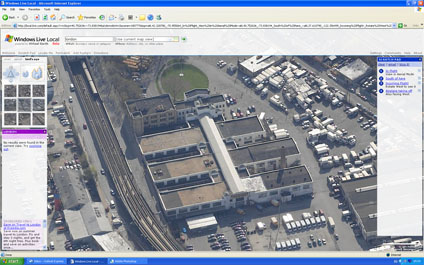
Microsoft's Live Local includes 'Birds Eye' images which provide various views around buildings. As such although it breaks all the ground rules of photogrammety by grabbing screen shots you can make a 3D model in Canoma:
The movie below details the basic output:
You could of course then port the model across to Google Earth in a slightly ironic way to create models for the 3D warehouse..
Seven years on and their is still no software to match Canoma's ease of use for 3D modelling, not even the beloved SketchUp - we miss it and if you can get hold of a copy on ebay we encourage you to. The output is not going to live up to the latest technology but for a few hours its worth going back to 1999 and realising just how good it was.
Thanks to Yukoncharile via Make the demo can still be found via http://volftp.tiscali.it/ (just type "canoma" in the search box)
For more info take a look at Canoma.com - just try not to get upset at the details of Canoma 2.0 which was about to be released before the buyout to Adobe.
A quick post on this as i am currently sat in a conference and about to lose computer access - an excellent article in technology review on the implications of merging Second Life and Google/Virtual Earth... 'The World Wide Web will soon be absorbed into the World Wide Sim: an immersive environment combining Second Life and Google Earth.'
In a follow up to our post on Extracting 3D Geometry from Drawings Barnabu - who modelled the Church of St Martin's in London - has kindly given us permission to include a movie of the now completed scene:
The model is simple in geometry but impressive in its impact in the move from drawing to 3D reconstruction - a concept that obviously opens up the applications of historic visualisation.
This should maybe be filed under the heading 'Fantasy Architecture' but the proposal for a Mega City Pyramid in Tokyo Bay is genuine although currently not feasible until new materials are developed to support the structure.
Housing over 750,000 people the city is a self contained off shore development 2,004 meters (6,575 feet) high. Extreme Engineering ran a feature on the development including some interesting visualisations, as ever it is now available on YouTube and embedded below:
The clip moves between the 'wow' factor of building such a structure and the 'disaster' scenario of an off shore development in light of possible typhoons and tsunamis.
To be honest we can't see it being built but the visualisation is impressive.
Constructing 3D models of buildings is all about extracting the geometry from images using photogrammetric techniques. As such, although it goes against basic geometric principles it also lends itself to historic reconstruction via referenced hand drawn images.
Over eight years ago we used the now sadly demised software CANOMA to create a view of London in 1616 - as the YouTube movie below illustrates:
CANOMA excelled at such scenes as it required only a single image to define the 3D space compared with many photogrammetric packages which require matching views and overlapping construction points.
Using a previous version of SketchUp - without the PhotoMatch feature - we rediscovered modelling from paper with our take on the Bank of Hong Kong in Google Earth modelled using Skyscrapermodels.us by John Townsend as a resource. The site provides full plans of a number of notable skyscrapers which are designed to be printed out onto card or paper and folded to construct the geometry.
Taking this further Google SketchUp now has the ability to 'PhotoMatch' allowing one to carry out a similar technique to the one used in CANOMA. An example of which can be seen in the model of St Martin's in the Field Church, London, by barnabu:
A future project is to reconstruct the Old St Paul's in London - but as SketchUp is free and easy to use then if you get there first let us know - the reference image can be found here.
For those interested in 360x180 panoramic images - such as the image of Westminster Abbey to the right - we have updated our flickr group with a number of new photographs. Although not strictly new they are the result of moving over to a new machine and finding a lost archive of images.
The Digital Urban Flickr group is set up to allow readers of the blog to upload any images of the urban environment - either real or rendered - simply login to Flickr or set up a free account and click here to join the DigitalUrban Group.
The second in a series of posts looking at user created cities in the freely available Google SketchUp software.
Created by a user known as RLgun the model is entitled 'Paradise City' - 'A huge city created out of imagination, it has gas stations, fast food joints, an airport, skyscrapers, a mansion, and much much more. It took me at least a week to complete. You have to download it and view it at street level to see how gigantic it is.'
The movie below is captured in real-time via SketchUp with 'hidden line' rendering to detail the city model:
Taking images from above the ground adds a slightly different perspective to panoramas. Using a D80 with a 10.5mm lens the image to the right is a test shot taken 6 metres above the ground.
Within the scene are the three Grade II listed buildings the phoneboxes set against the backdrop of the Church of Christ the King in Bloomsbury.
The Red Phonebox is a classic design by Sir Giles Gilbert Scott who amoungest other notable buildings also designed Battersea Power Station. The K6 "Jubilee" model pictured here was built to commemorate the Silver Jubilee of King George V in 1935.
Google Street View launched only a few weeks ago and now there is a new contender on the block in the shape of EveryScape. Using a different camera system Everyscape allows a full 360x180 field of view as well as the placement of those all important hotlinks (thus advertising revenue) in the scene.
The major selling point is however the transition between scenes, using some clever image precessing each scene is linked using a semi 3D zoom providing continuity to the navigation when compared against Street View.
The movie below provides a quick demo of the system.
Take a look at the EveryScape site to try it out yourself, still in beta stage they have Boston, New York and Seattle coming soon.
Thanks to Andy Hoskins for emailing us the site tip..
I am off to give a talk at the Oxford Institute for Technology today so posts will resume as normal tomorrow. Of interest this week is a review of the recently released RealViz Stitcher Unlimited, the second part of the Oblivion Games Engine Tutorial and news on our update to Google Map Creator, funded as part of the E-Science node of NeCSS.
According to the Wiki the Dubai Waterfront is proposed to become the largest waterfront and largest man-made development in the world. The project is a conglomeration of canals and artificial islands; it will occupy the last remaining Persian Gulf coastline of Dubai, the most populous emirate of the United Arab Emirates. It will consist of a series of zones with mixed use including commercial, residential, resort, and amenity areas. The vision of the project is "to create a world-class destination for residents, visitors and businesses in the world's fastest growing city".
Developed around 11 key zones the total coverage will be larger than Manhattan and housing 700,000 people. In essence the development is a new city on the waterfront in a city that is expected to grow from 1.2 million to 4 million in population by 2020.
The marketing movie below provides an insight into the plans:
As is to be expected form Dubai the vision of architecture, urban design and town planning have been integrated into a living environment and skyline that approaches an almost Bladerunner-esk view.
Photosynth is one of those applications that has the potential to change the way we view images and 3d models of our environment. By automatically linking images together in a spacial context each photograph becomes part of a three dimensional model. This not only allows ease of navigation and a better understanding of the geographic context of each image but also allows the rapid construction of three dimensional space.
Microsoft have just released another preview of Photosytnh, this time featuring Trafalgar Square in London. The YouTube movie below details our first navigation around the scene:
To gain a further insight into Photosynth it is worth taking 5 mintues to sit back and watch a presentation below by Blaise Aguera y Arcas:
Of note is the integration with Flickr and other photosharing sites - essentially allowing a global image base to be integrated within Photosynth. If you combine this with imagery via Microsoft's Virtual Earth - notably BirdsEye - then you begin to approach a new way to visualise image data in 3D space..
Visualising global data via a single chart is always problematic unless you want to illustrate a single moment in time - as per the excellent data sharing site Many Eyes. While Many Eyes is impressive and a step forward in data sharing it does not allow data visualisation over time, unlike the recently Google acquired 'The GapMinder'.
The movie above illustrates a screen grab visualising Life expectancy in years against the percentage of population categorised as living in urban areas between 1960 and 2003. Of note its the way the data can be played over time making the data and more importantly the tends in the data suddenly understandable.
The Gapminder Foundation state that 'There has been a market failure in distributing global data. A lot of people are interested in the data, but don’t get access to it (and if they manage to access the data, they need to be advanced skilled statisticians to analyze it). Gapminder wants to make data more accessible and easier to use for instant visual analysis. We believe decision makers, politicians as well as education at almost all levels lack adequate tools'.
SketchUp allows users from all walks of life the ability to build whatever they may wish and subsequently share the model with the world via the 3D Warehouse - a Google service that lets you search, share, and store 3D models.
As such it opens up the way to the creation of modern cities and fantasy architecture rather than the more traditional route of modelling real-world buildings for inclusion in Google Earth.
In a new series of posts we will be featuring models submitted to the 3D Warehouse - first up is 'Modern City' by a user known as jblsscad.
The movie above features the model directly captured in real-time via SketchUp in firstly textured mode and then moving onto monochrome, highlighting the underlying geometry, before finally switching on the shadows.
A nice feature to add into the 3D Warehouse would be the ability to leave comments or messages for users - in a YouTube type manner - at the moment its difficult to track down any contact information for the users who created the models.
SketchUp is without question our favorite piece of software here at Digital Urban. Its shear ease of use, combined with genuine useful and innovative tools and the ability to import/export to Google Earth makes it a must have download. Yet SketchUp has not generated the 'buzz' online that we thought it would - where is a SketchUp blog that's is as useful as say the Google Earth blog for example?
The video below provides a quick overview of SketchUp (Pro Version):
The fact that it is possible to download a free fully functional CAD program that could teach 3DMax a few tricks is a major step forward compared with a couple of years ago when CAD was limited to high end/expensive software. With this has been the development of the Google 3D Warehouse, another slightly undersung resource.
Time was that if you wanted a 3D model you had to go to the various online services and pay per download - with models of urban areas often attracting high prices. Googles 3D Warehouse has changed all this with a ever growing list of models and components ready to download and use - either in Google Earth, SketchUp or third party software such as BeLight's Live Interior 3D 1.1
The point of this post started out as a write up of the collaborative possibilities in linking SketchUp and Google Earth and the notable difference between Microsoft and Google's approaches to city modelling - but more on that soon. It ends in a simple question of why SketchUp has perhaps not got the user recognition it should and if you haven't already then to take half hour out to download it out try it out yourself.
Future posts on SketchUp include using your Nokia N95 and SketchUp to model your home or neighbourhood...
*Update*
As an update to this post it turns out Google launched their official SketchUp blog only last Friday. Typical, you write a post about the lack of decent blogs on SketchUp and then the official one comes along - check out theGoogle SketchUp Blog.
Trinity Buoy Wharf, located in Tower Hamlets, London is home to London's only Lighthouse. The lighthouse was built not for navigation, as is normally the case, but as a testing rig for the lights developed by Trinity House for its network of lighthouses and lightships.
The lighthouse was designed by Sir James Douglass, who also designed, amongst others, the Eddystone Lighthouse in Plymouth. Built in 1894 the workshops next to the main tower was used by Michael Faraday for his workshop experimenting in electric lighting on behalf of Trinty House.
Communicating new transit systems in cities is not an easy task as by default it requires the integration of the current city space into the 3D scene. Archipel Architecture, a company based in Vietnam employing French architects, has produced an impressive visualisation of the planned light transit system in the city of Hanoi:
The choice of music furthers the visualisation, providing a good insight into both the city and the proposed transit system. The project aims to launch in 2010 to mark the 1000th anniversary of the founding of Hanoi city.
True its going off message slightly, but it does contain maps and you could use it to augment models for architecture and planning in a public meeting (sort off).. but the advert for Microsoft's Surface Computing just makes us want one:
Interesting to note that when you see the map your left wanting more - too flip into 3D mode and Google Earth - Google Earth on a Microsoft Surface Computer now that would be good.
Crescendo Design has been using Second Life as a professional tool in their real life practice. Their site states that virtual reality component of their services consists of model homes and current design projects, as well as the Virtual Studio, where they conduct meetings and showcase our work.
The video below provides an insight in the building and construction process within Second Life:
The move of architects towards embracing Second Life is of interest as its one that did not happen within ActiveWorlds. Although almost 6 years ago, virtual worlds were looked upon as more of a 'game' rather than a social phenomenon. Yet with the rise of social networks, Second Life is suddenly being embraced by the big players and increasingly the smaller ones as well.
Only yesterday we got a call from a real-estate agent wanting models in Second Life and we cant help thinking that ActiveWorlds was before its time - especially in allowing the ability to import direct from 3DMax/AutoCad so there was no need to rebuild everything.
The movie below illustrates our early photomodelling work in ActiveWorlds - go easy its 5 years old..
Although controversial Second Life just doesn't quite hold up to the hype. It needs the ability to import full polygon models and a realtime (or baked) lighting system ala the long lost Adobe Atmosphere or the recently launched Blink 3D.
For comparison's sake below is a movie of our old work in Adobe Atmosphere:
Whoever withdrew Atmosphere at Adobe may of jumped ship too soon, it was an innovative product and certainly a lot more flexible in terms of virtual architecture than today's Second Life..
Tecton Limited - a value-added partner in the real estate and construction cluster. Have placed an interesting video on YouTube of a building being virtually constructed on a desktop. The same thing could be carried out using basic Augmented Reality - see our 'Desktop (Literally) Augmented Reality' post for more info - nevertheless its interesting how construction firms are looking into such visualisation techniques:
Combining a multi-touch interface with embedded infra-red cameras for object tracking Microsoft's Surface Table Computer looks like it will be a common sight in research labs before the years end.
Popular Mechanics produced a 'hands on' video of the surface computer and kindly provide a link so it can be embedded below:
We have seen computer tables come and go over the last few years in our various labs but this one seems genuinely useful - note the way it is used for mapping applications.
As we mentioned in our post 'Google Street View - A Closer Look' the technology is subject to the cameras going out of alignment. This, combined with image flare, can create errors in the scene and a Flickr user by the name of Stallio has been grabbing screen shots to illustrate the point. See the Flickr slide show below for the images so far:
Morphing software is primarily used to move between a series of peoples faces. All and well and good but it may also work in terms of the city. Below is out first test - morphing the London Tube to the Seoul Subway:
We should have more of these and if deemed worthy a 'how to' in the coming weeks..
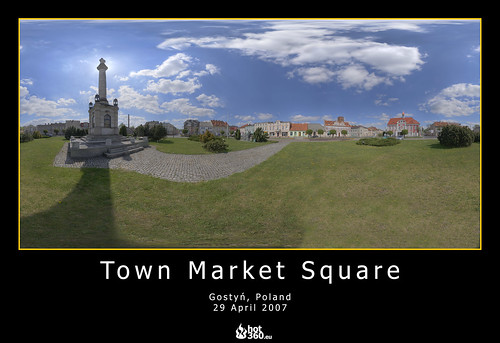
Dawid Gorny of "www.wirtualnygostyn.pl has uploaded over 30 images to our digital urban flickr group. Taken in and around the town of Gostyn in Poland Dawid captures his images using using Canon 400D camera with 18-55mm kit lens - for High Dynamic Range images this requires over 90 photographs.
Dawid's site is well worth a look due to both the high quality of the images and the sense of place gained by viewing the images and the map.
Using the very easy to use script from Pictobrowser you can embed the Digital Urban Flickr group - or any Flickr set - in a webpage or blog:
























 The ability to add a 'one shot' panoramic lens to a digital camera has been around for a while and although the combination works it is unwieldy to carry around. Bubblescope have taken the 'One Shot' lens method and built a camera around it - resulting in world’s first standalone, single-shot panoramic digital camera for capturing experiences as 360º x 104º. Using BubbleScope® 1.0 software on a PC and Mac the resulting images can be converted to QTVR movies.